Introducing Objectives 2.0: Powerful Filtering for XR Workflows


Introducing Objectives 2.0: Powerful Filtering for XR Workflows
We’re excited to announce Objectives 2.0: a major upgrade that brings powerful filtering and segmentation capabilities to Objectives in Cognitive3D.
Objectives have always helped measure if users complete key tasks. But once the data was collected, the ability to break it down was limited.
With Objectives 2.0, that changes.
You can now filter sessions, users, dashboards, and even objective results based on real user behaviour, including step completions, failures, and timing.
What’s New in Objectives 2.0
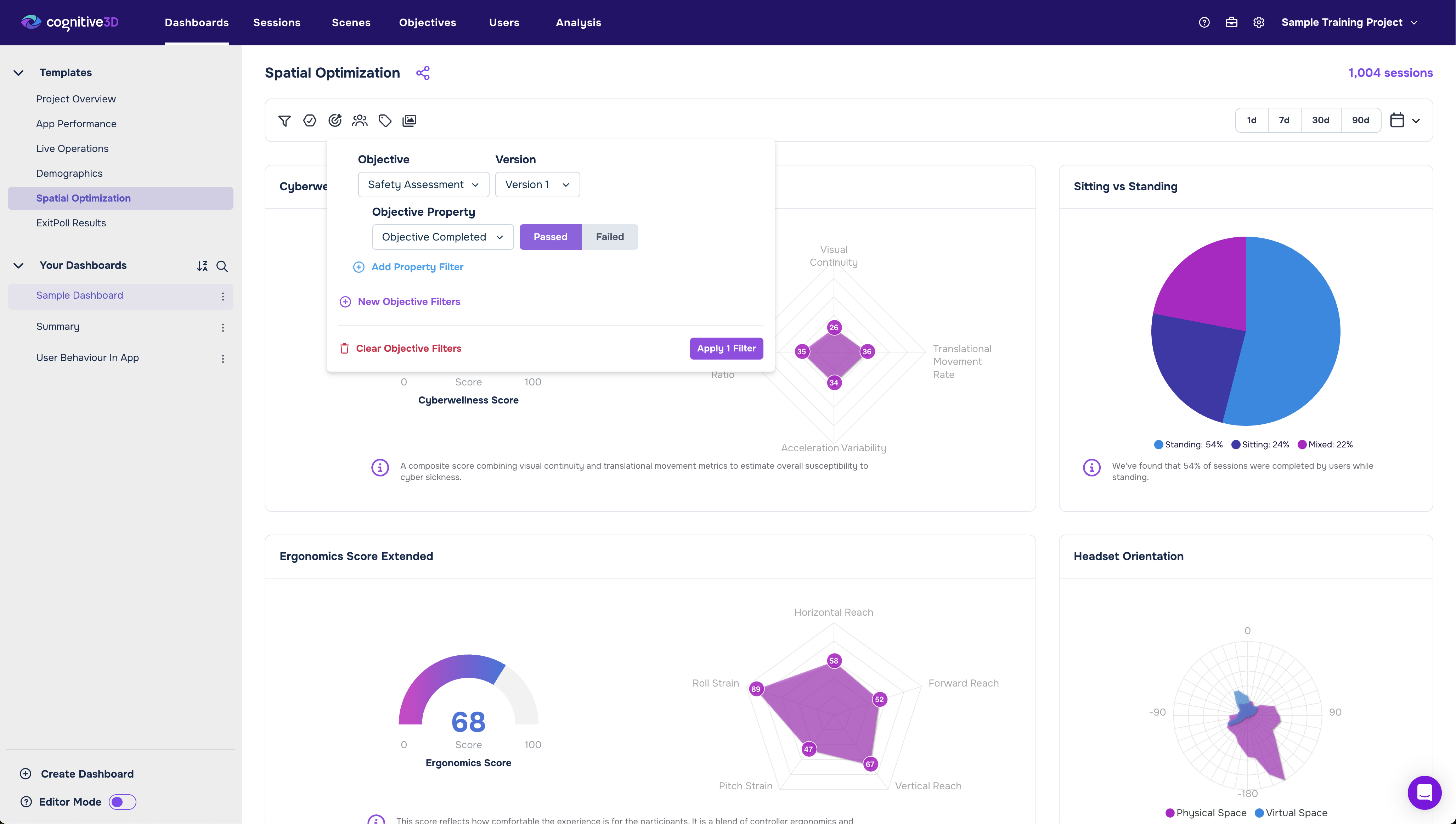
Filter Sessions and Users by Objective Completion
You can now filter sessions and users based on whether they:
- Completed an objective
- Failed an objective
- Completed specific steps
- Took longer or shorter than expected
This makes it easy to answer questions like:
- What differentiates successful sessions from unsuccessful ones?
- What behaviours lead to drop-off?
- How does user performance vary across scenes or builds?
Instead of looking at aggregate averages, you can now segment by real outcomes and compare groups directly.
Filter Inside the Objective Page
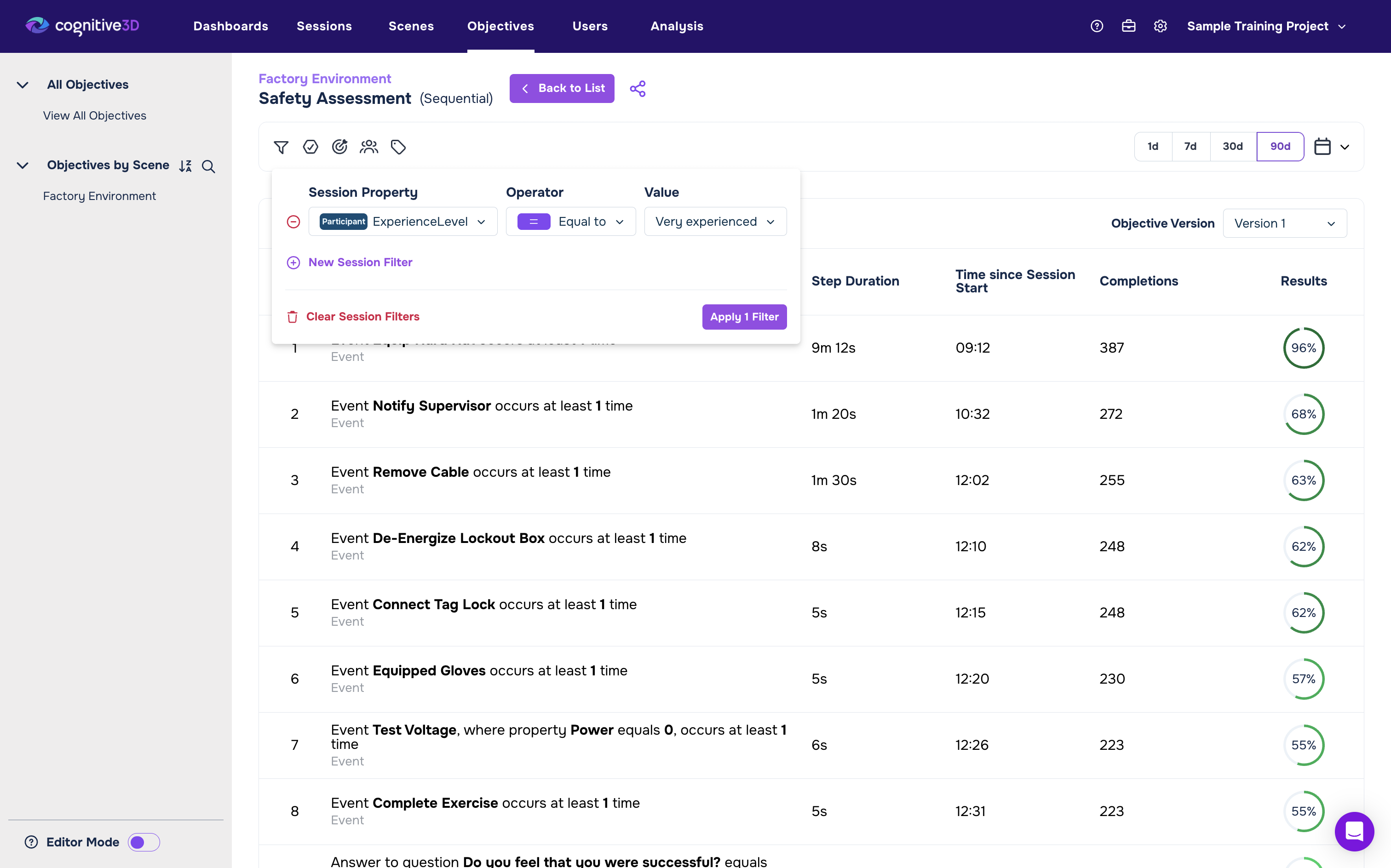
One of the biggest upgrades: Objectives now support filtering directly within the Objective view.
On the Objectives page, you can now:
- Filter by session properties and criteria
- Apply time filters (e.g., All Time, specific date ranges)
- Break down results after the session is recorded
- Compare and contrast different user groups
You’re no longer locked into a static success rate.
Now you can actively explore the data. Isolate specific cohorts, validate behaviours, and create meaningful sections of users based on how they behaved.
Step-Level Filtering: Completions, Failures & Timing
Objectives 2.0 goes deeper by exposing individual step performance in filters.
Sessions, users, and dashboards can now be filtered by:
- Step completions
- Step failures
- Step timing
This is especially powerful for:
- Identifying friction points in multi-step workflows
- Validating onboarding flows
- Troubleshooting training simulations
- Measuring operational performance
If step three consistently causes delays or failures, you’ll see it, and you can immediately isolate those sessions for deeper analysis.
A Clearer View of Performance
The updated Objectives view now provides clearer performance reporting across:
- Total Sessions
- Successful Completions
- Visual Results indicators
- Scene-level context
This makes it easier to monitor performance at a glance, and then drill deeper using filters when something stands out.
Whether you’re tracking hazard identification, evacuation routes, inspections, or assembly tasks, Objectives 2.0 gives you the flexibility to analyze outcomes from every angle.
Why This Matters
Before Objectives 2.0, there were no filtering options within Objectives. You could see performance, but not reshape it.
Now you can:
- Break data down after the fact
- Compare successful vs unsuccessful behaviour
- Verify user actions instead of assuming intent
- Create sections and segments based on real-world outcomes
Objectives are no longer just a tracking tool.
They’re now a segmentation and validation engine.
Available Now
Objectives 2.0 is live in your Cognitive3D dashboard.
If you’re already using Objectives, the new filtering capabilities are ready for you today.
If you haven’t built Objectives into your workflow yet, now is the perfect time.