Introducing 3D Zones: Measure Activity in the Areas That Matter


Add Location to Your Spatial Analysis
In XR and robotics, where something happens can be just as important as what happens. A training lead may want to know whether a trainee reached the workbench before starting a procedure. A research team might want to understand how long participants spent near a product display. A robotics team may need to confirm that a robot entered its assigned area during a run.
These are all spatial questions, and they often come from the people closest to the outcome: instructors, researchers, operations leads, product owners, and other subject matter experts. Cognitive3D already gives these teams detailed spatial data to understand movement, gaze, interactions, events, and complete sessions. With 3D Zones, we are adding another way to turn that spatial behaviour into measurable insights.
Available in the Cognitive3D dashboard as Zones, this new capability lets you draw meaningful areas directly onto a scene, automatically measure activity within them, analyze how those areas are used across sessions, and incorporate location into Objectives.
Turn Meaningful Areas into Measurable Data
Every 3D environment contains areas that have specific meaning to the people analyzing it. In a training simulation, that might be a workbench, safety area, inspection point, or equipment station. In a robotics application, it could be a loading zone, navigation area, or restricted space. In research and product experiences, it might be a counter, display, sign, or piece of content.
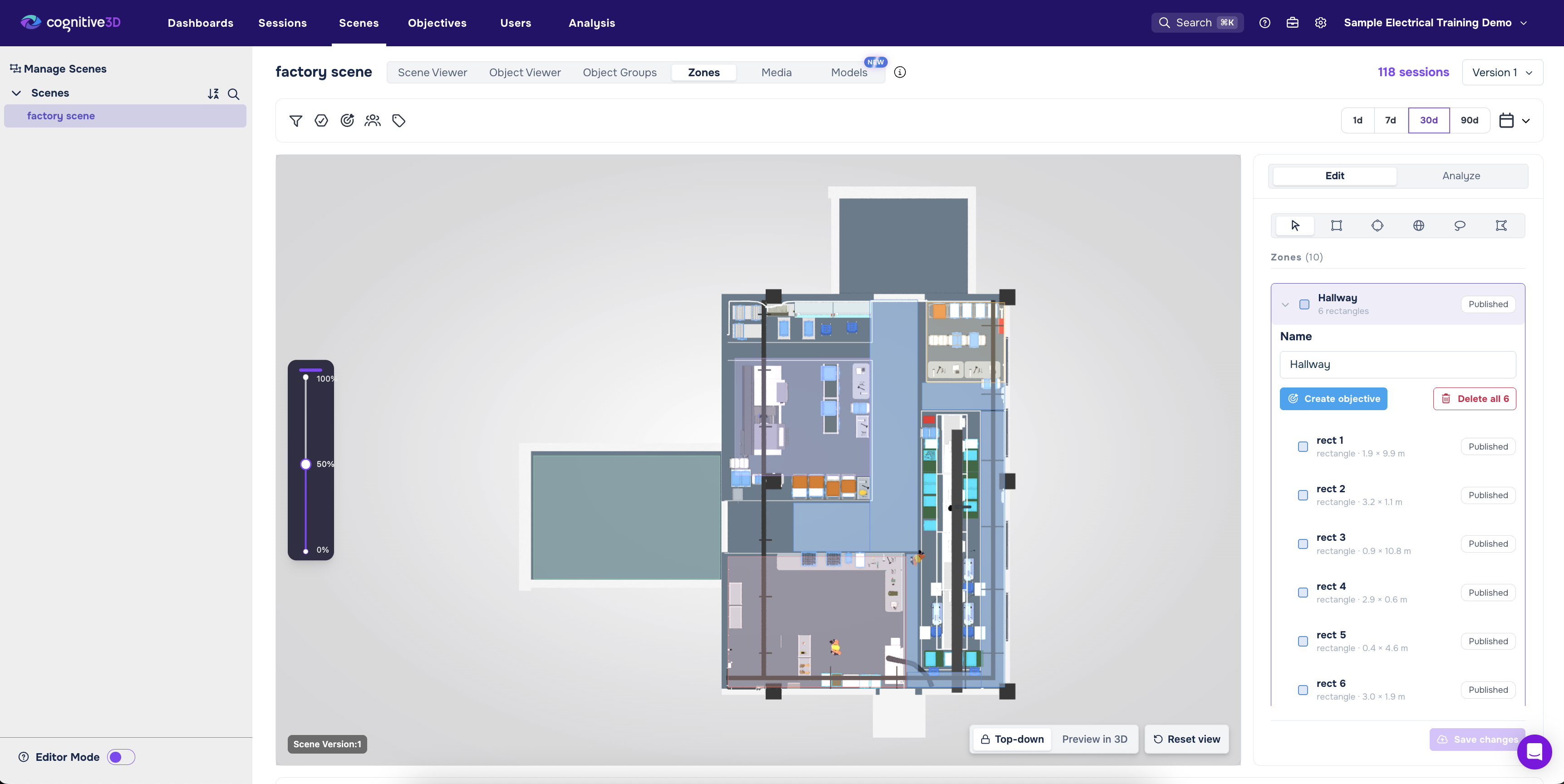
With Zones, you can draw those areas directly onto the 3D scene and give them meaningful names such as “Loading Zone,” “Workbench,” or “Safety Area.” Zones can be defined in the dashboard and Session Replay, using the same scene teams already use to explore their sessions.
A single Zone can also include several shapes grouped together. This gives teams flexibility when the area they care about does not fit neatly into one shape. A warehouse staging area, for example, might include two separate bays that serve the same purpose. Both can be grouped under one Zone, giving the team one consistent definition to use throughout its analysis.
Once defined, these areas become a shared spatial vocabulary. Instead of interpreting the boundaries of a work area, safety area, or station differently from one analysis to the next, teams can establish the area once and use that definition consistently across sessions, reports, and Objectives.
Measure Different Kinds of Visits
Once a Zone is saved, Cognitive3D can automatically track activity within it during new sessions, including when the Zone was entered, when it was left, and how long the visit lasted. Teams can also choose what counts as a visit based on the question they are asking. A visit can be determined by where someone was positioned, where they looked, or what their line of sight crossed.
That distinction is important because presence can mean different things in different applications. In a safety drill, physically standing inside a particular area may be what matters. In a consumer research study, a participant looking at a display from elsewhere in the environment may be the more meaningful signal. In a robotics workflow, physical position might be used to confirm whether a robot entered an expected operational area.
For teams already collecting the relevant spatial and gaze data, these questions can be defined directly in Cognitive3D without adding a custom event or shipping a new application build. This gives teams more flexibility to explore spatial questions as they emerge, using data already being captured during their sessions.
Explore Past Data Before Saving a Zone
Zones are designed for ongoing measurement, but spatial questions do not always begin with a predefined area. Sometimes a team wants to explore the data first and determine exactly where the boundary should be.
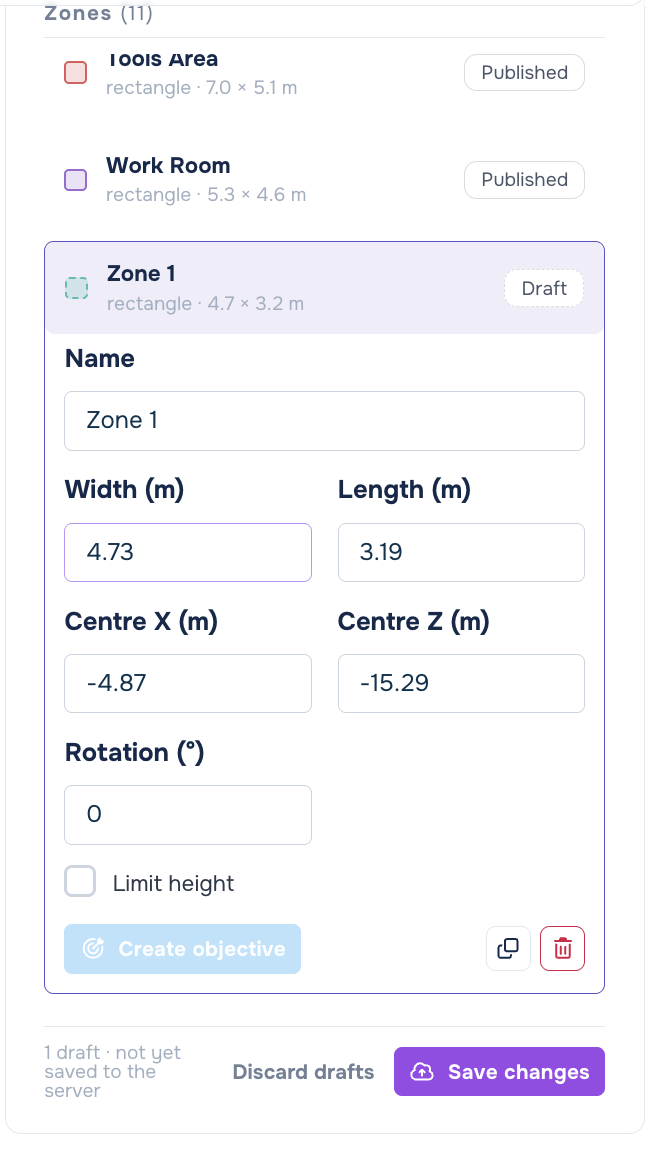
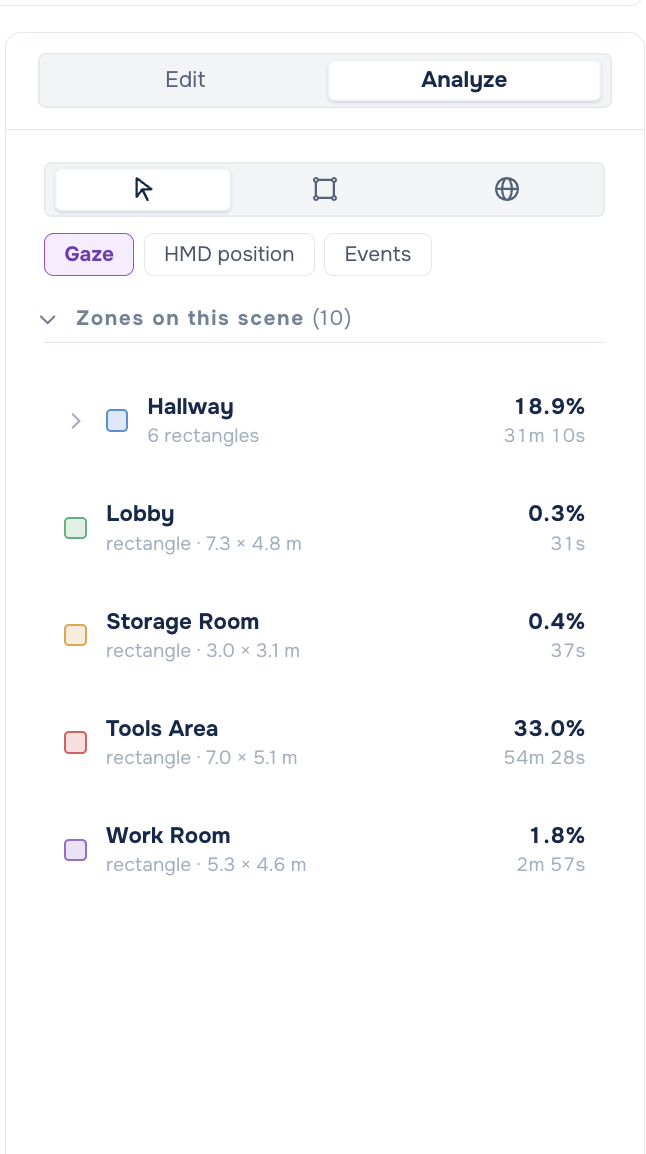
Analyze mode supports that workflow by letting users draw a shape and count historical gaze, position, and event data within it, even if that shape has not been saved as a Zone.
This creates a useful distinction between exploration and ongoing measurement. Analyze mode lets you investigate historical session data within an area, while saved Zones track visits during new sessions going forward. For example, a research team could draw an area around an exhibit and see what existing sessions reveal about activity within it, then adjust the boundary, compare the results, and refine the definition before saving it as a Zone for future analysis.
This gives teams a way to explore spatial questions using data they have already collected, while also establishing consistent areas they want to measure over time.
See Zone Behaviour Across Sessions
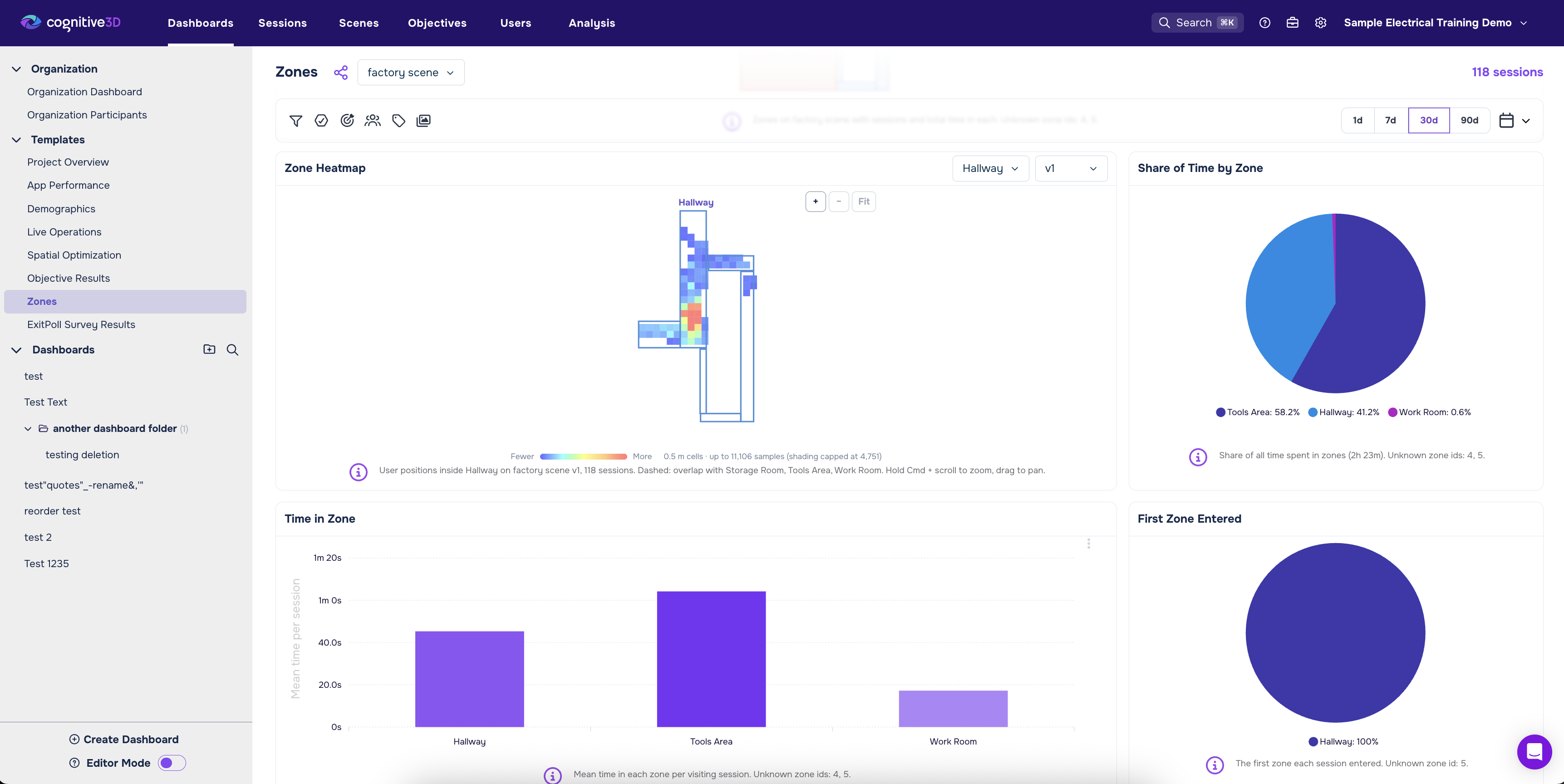
A new Zones Report template brings Zone activity together at the aggregate level. Teams can explore sessions per Zone, time spent in each Zone, share of time across Zones, a Zone map, heatmaps, and visits over time.
These views make it easier to understand how different parts of an environment are being used. An operations team might compare which stations receive the most activity and where people tend to spend more time. A training team could look across a cohort to understand how consistently trainees visit key areas. A research team could compare activity around different displays or pieces of content.
Instead of treating an environment as one continuous space, Zones give teams a way to organize spatial behaviour around the locations that have meaning for their application. Those definitions can then be followed consistently across people, sessions, and time.
Add Location to Objectives
Zones can also become part of how teams define success. From the Zones list, users can create Zone Objectives that turn spatial behaviour into pass or fail criteria. An objective might require someone to visit a designated safety Zone twice and remain there for at least 10 seconds each time.
This expands the types of conditions that can be evaluated with Objectives. Alongside gaze, fixations, and events, teams can now incorporate location and duration into their definition of successful performance.
In training, an Objective might verify that a trainee reached the correct inspection point and remained there for the required amount of time. In robotics, a team could evaluate whether a robot entered its assigned Zone during a run. Location can therefore become part of the same performance picture as the actions that took place there, allowing teams to evaluate not only whether the expected interaction occurred, but whether it happened in the right spatial context.
Turn Subject Matter Expertise Into Spatial Insights
One of the most useful aspects of 3D Zones is who can define the analysis. Spatial questions often come from the people who understand the environment and its intended outcomes best. An instructor knows which areas matter during a training procedure. A researcher knows how a study environment should be divided. An operations lead understands which stations or work areas are significant to a process.
Because Zones can be drawn and refined visually in Cognitive3D, those teams can translate their questions into measurable areas themselves. They can define a Zone, explore historical data within a shape, track visits in future sessions, and incorporate location into Objectives without first translating every new spatial question into a custom application event.
That makes spatial analysis more adaptable. As new questions emerge, teams have another way to investigate them using the spatial data Cognitive3D captures.
Another Layer of Spatial Context
3D Zones expands the ways teams understand what happens throughout XR and robotics sessions. For training teams, location and duration can become part of performance criteria. Robotics teams can measure activity within operational areas. Research and consumer insights teams can compare presence and attention across participants using consistent spatial definitions. Product and operations teams can evaluate how stations, displays, signage, content, and other parts of an environment are actually being used.
Together with Session Replay, aggregate reporting, Analyze mode, and Objectives, Zones add another layer of context to spatial analysis. They connect activity to meaningful areas in the environment, helping teams move from knowing what happened during a session to understanding where it happened, how long it lasted, and what that means for the outcome they are measuring.
Get Started with 3D Zones
3D Zones is now generally available in Cognitive3D and appears as Zones in the dashboard. Start by drawing a Zone around an area that matters to your analysis. From there, you can measure visits in new sessions, explore historical activity with Analyze mode, compare Zone behaviour in reports, and incorporate location into Objectives.
Want to see how 3D Zones can support your XR or robotics workflows? Contact Cognitive3D to learn more.
Ready To See Inside Your XR App?
Start capturing real user behaviour, app activity, and device inputs in full 3D.