Analyze Session Details: Turn Every XR Session Into a Complete Source of Truth


Every XR Session Creates Evidence
Every XR session leaves behind a trail of evidence. A learner hesitates before completing a task. A participant misses a key instruction. A player looks past the object they were meant to find. A device slows down at the exact moment performance matters. These moments are not small details. They are the difference between guessing at what happened and knowing exactly where an experience succeeded, failed, or needs to improve.
The problem is that most teams cannot access that evidence fast enough. Session data gets scattered across replays, dashboards, exports, notes, device logs, feedback, and stakeholder memories. By the time the team pieces the story together, momentum has already slowed. Analysts lose hours reconstructing context. Developers chase symptoms without knowing the full sequence. Training, research, and product teams make decisions from partial views of the experience.
That is where session details become essential. XR teams do not just need more data. They need a complete source of truth for every session, one that brings behaviour, context, outcomes, and technical signals together so every review starts from evidence, not assumption.
When Session Review Becomes Fragmented
In traditional digital analytics, a session might be reduced to clicks, timestamps, and event counts. That can work for flat interfaces, where the interaction path is relatively linear and the environment is predictable. XR is different because the experience unfolds spatially, physically, and behaviourally all at once.
An immersive session includes movement, gaze, interactions, objectives, device conditions, feedback, and spatial context. The meaning is often not found in any one data point, but in how those data points connect. A user did not simply fail a task. They may have missed an instruction, looked at the wrong object, moved through the space inefficiently, experienced a device issue, or abandoned a step after repeated attempts.
Without a unified view, teams are left asking the same questions again and again. What happened in this session? Which user was involved? What device or platform was used? Which objectives were completed, skipped, or failed? What data streams were captured? Is there feedback attached? Can we replay the session? Can we download the data for deeper analysis?
When those answers live in separate places, the review process becomes a reconstruction effort. Every extra step creates friction, and every missing detail creates uncertainty. Instead of moving directly into analysis, teams spend valuable time trying to assemble the basic facts.
The Session Is the Source of Truth
A session is more than a container for data. It is the record of an experience. For XR teams, that record matters because individual sessions often explain patterns that aggregate dashboards can only reveal at a high level.
A trend might show that completion rates dropped, but a session record can show where one user struggled, what they saw, what they did, and what else was happening at the same time. A dashboard might show lower engagement in a scene, but a session-level review can reveal whether users were confused, distracted, blocked, or affected by performance conditions.
That distinction is important. Aggregate insights help teams detect patterns, while session details help teams understand the evidence behind those patterns. One view tells you that something changed. The other helps you investigate why.
This is especially useful when teams need to inspect a failed training objective, review a confusing interaction, investigate a performance issue, analyze participant feedback, compare device-specific behaviour, or prepare a session for replay, export, or reporting. In each case, the goal is not to collect more data for its own sake. The goal is to make session review faster, clearer, and more defensible.
How Cognitive3D Centralizes Session Details
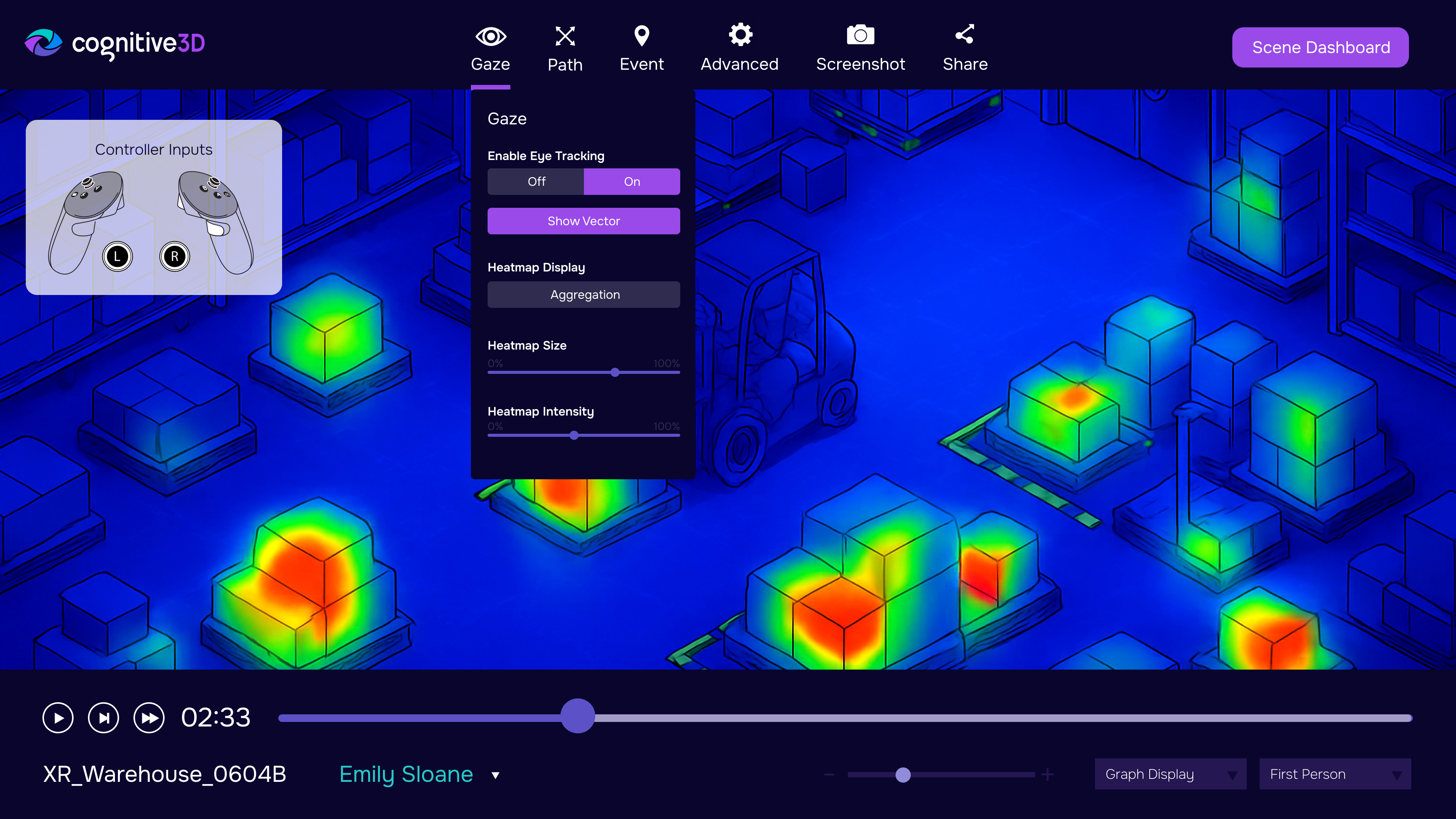
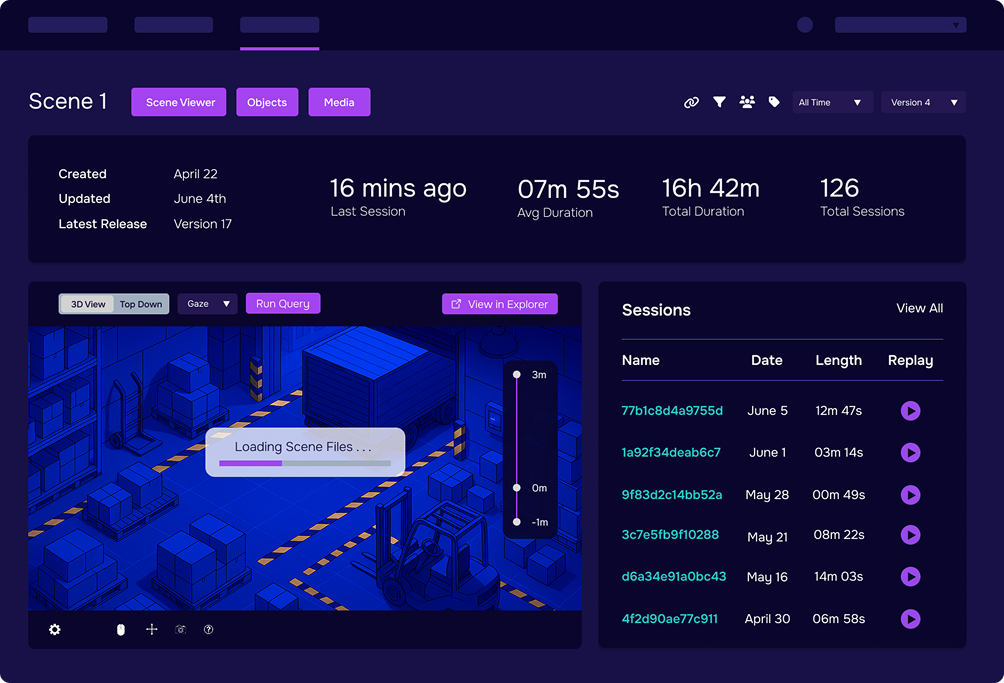
Cognitive3D’s Analyze Session Details capability brings session information together in one organized view, so teams can inspect complete session records without jumping across disconnected tools. Instead of piecing together context from multiple sources, teams can begin with a single session-level record and move into deeper review from there.
From a single session, teams can review key details such as session date and time, duration, participant name, session ID, captured data streams, platform and device context, objective data, sensor information when configured, feedback, timelines, replays, and downloadable session data. This gives analysts and reviewers the context they need to understand what was captured and where to go next.
That unified record creates a stronger starting point for analysis. Instead of asking where the data lives, teams can ask better questions about what the data means. What does this session tell us? Where did behaviour change? Which moment deserves closer review? What should we compare next? What should we improve before the next cohort, study, build, or release?
From Isolated Data Points to a Complete Review Workflow
Session details become especially valuable when they connect individual evidence to the rest of the Cognitive3D workflow. A team might begin with a top-level metric that shows a change in completion, comfort, feedback, or usage. From there, they can move into a specific session and inspect the details behind the pattern.
If the session needs deeper review, teams can jump into replay, review objectives, inspect the activity timeline, or download session data for reporting and further analysis. This creates a natural review path that moves from signal to context, then from context to action.
The workflow is simple but powerful. Teams can start with the signal, open the relevant session, inspect the surrounding context, replay the behaviour, review the timeline, and export the data when deeper analysis is needed. Each step keeps the session connected to the broader evidence trail.
This matters because XR decisions are rarely made from one number. Teams need evidence they can interpret, discuss, and defend. For training teams, that may mean reviewing whether a learner completed a required task and where they struggled. For research teams, it may mean validating participant behaviour against a study design. For product and UX teams, it may mean understanding why a user missed an object, ignored a cue, or moved through the scene differently than expected. For developers, it may mean connecting performance, device, or interaction data to a specific session.
The session record becomes the bridge between what the team noticed and what the team can prove.
Why Session Context Changes the Quality of Decisions
Without session context, teams often argue from memory, opinion, or partial data. One person remembers the participant looking confused. Another sees a failed objective. Someone else suspects a device issue. Another team member wants to compare the session against similar users or earlier versions.
Each view may be useful, but none of them is complete on its own. A complete session record creates alignment because it gives the team a shared place to inspect what happened. Instead of debating competing interpretations, reviewers can return to the same session evidence and examine the experience from multiple angles.
That changes the tone of review. Instead of asking whether a problem was real, teams can examine the evidence. Instead of guessing why a user struggled, they can review the session details, replay the behaviour, and compare the timeline against objectives, feedback, and captured metadata.
This is where XR analytics becomes practical. Not as abstract dashboards or disconnected exports, but as a clear review workflow that helps teams move from observation to decision. When the session record is complete, teams can spend less time reconstructing the story and more time improving the experience.
The Practical Value of Analyzing Session Details
Analyzing session details helps teams work faster because it reduces the friction involved in individual review. Key information is available in one place, which means analysts and stakeholders can quickly understand the basics of a session before deciding whether to investigate further.
It also improves accuracy by preserving session context alongside behaviour and outcomes. A failed objective means more when teams can see the surrounding device context, session timeline, captured data streams, and available feedback. A performance issue becomes easier to understand when it is connected to the exact session where it occurred.
For collaborative teams, this creates a more reliable shared record. Product, research, development, and training stakeholders can refer to the same session details instead of relying on separate notes or interpretations. That shared context supports clearer reporting, faster troubleshooting, and more confident decision-making.
Most importantly, it helps teams avoid treating XR behaviour as a mystery. When every session has a clear record, individual review becomes less reactive. Teams can trace what happened, understand why it may have happened, and decide what to do next with greater confidence.
That is useful whether the goal is improving a training module, validating a study, refining a game mechanic, testing a product experience, or preparing data for deeper analysis.
Next: Replay Sessions to See the Behaviour in Context
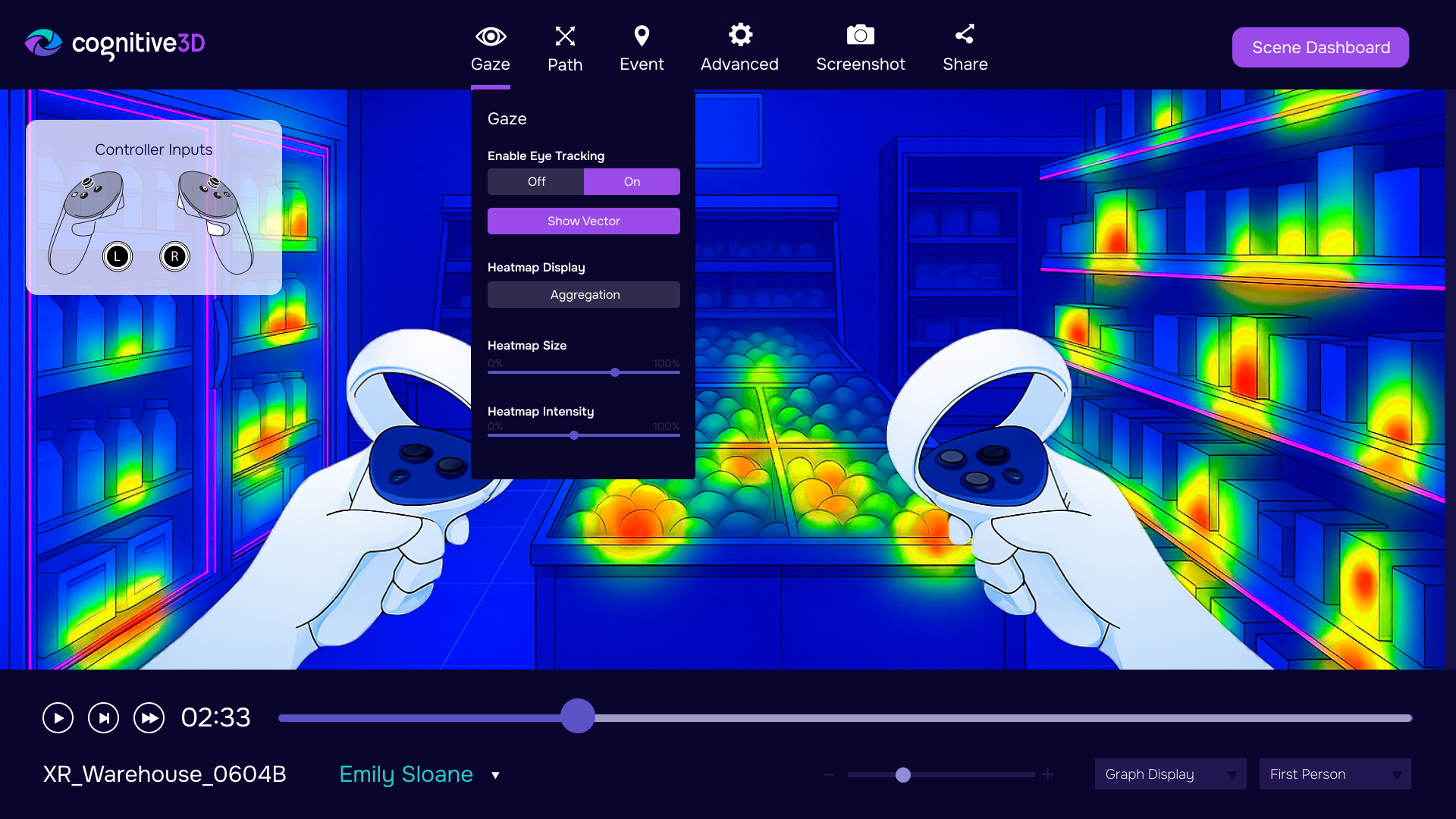
Session details tell you what was captured. Session replay helps you see how it happened. Together, they give teams both the structured record and the spatial context needed to understand immersive behaviour.
Once a team identifies an important session, the next step is often to review it in 3D. Replay adds context to the session record by showing how the user moved, where they looked, what they interacted with, and how the experience unfolded over time. This helps teams connect the facts of the session to the lived behaviour inside the XR environment.
Session details and session replay are stronger together. One helps you inspect the data, while the other helps you understand the experience. When both are available, teams can move from a session record to a behavioural explanation with much less guesswork.
When Every Session Is Clear, Teams Move With Confidence
XR teams do not need more scattered data. They need a reliable way to turn each session into evidence. Analyze Session Details gives teams a clear place to start by bringing metadata, objectives, device context, captured data streams, feedback, timelines, replays, and exports into a more usable review workflow.
That clarity matters because every unresolved question has a cost. When teams cannot quickly understand what happened in a session, they lose time searching for answers, repeating tests, debating interpretations, or making changes based on incomplete information. A complete session record helps reduce that friction by making the evidence easier to find, review, share, and act on.
For training and simulation teams, session details can help identify where learners struggle, which steps create confusion, and which experiences are ready to scale. That supports stronger training programs, faster remediation, and more defensible performance reporting. Instead of relying only on completion scores or post-session feedback, teams can connect outcomes to the actual behaviour that produced them.
For research and academic teams, session details create a stronger foundation for study review and participant analysis. Researchers can inspect individual sessions, verify what data was captured, connect behaviour to objectives or feedback, and export the right information for deeper analysis. That makes it easier to preserve context, support reproducibility, and explain findings with confidence.
For product, UX, and game teams, session details help reveal where users hesitate, miss cues, encounter friction, or behave differently than expected. That gives teams a clearer path from observation to iteration. Instead of guessing which design changes will improve the experience, they can use session-level evidence to prioritize fixes, validate improvements, and focus development effort where it matters most.
For enterprise and operational teams, session details also support better governance and reporting. When session records include participant, device, objective, feedback, and timeline context, teams can review XR activity with greater consistency across projects, locations, and stakeholders. That makes it easier to evaluate adoption, investigate issues, support internal reporting, and build trust in XR programs as they grow.
The ROI is not only in the data itself. It is in the decisions the data makes faster, clearer, and more reliable. When teams can quickly understand each session, they can reduce review time, shorten investigation cycles, improve training and product outcomes, and make better use of the XR investments they have already made.
In XR, every session tells a story. Cognitive3D helps teams read it, understand it, and use it to make the next experience better.
See Session Details in Cognitive3D
Explore how Cognitive3D helps teams analyze complete XR session records, replay behaviour in 3D, and connect individual evidence to better product, training, and research decisions.
Book a Cognitive3D demo to see how session details fit into your XR measurement workflow.
Ready To See Inside Your XR App?
Start capturing real user behaviour, app activity, and device inputs in full 3D.