Embeddable Session Replay: Bring 3D XR Evidence Into the Workflows your Teams Already Use


Extend Interactive 3D XR Playback Beyond the Cognitive3D Dashboard
Cognitive3D customers use Session Replay to understand what happened inside an XR experience in full 3D. It gives teams a spatial record of user movement, gaze, events, sensors, object engagement, and session context, so they can review real behaviour instead of relying on guesswork or flattened recordings. Until now, that evidence was mainly reviewed inside the Cognitive3D dashboard.
Embeddable Session Replay changes where that evidence can live. It changes Session Replay from a dashboard destination into a distributable 3D playback experience.
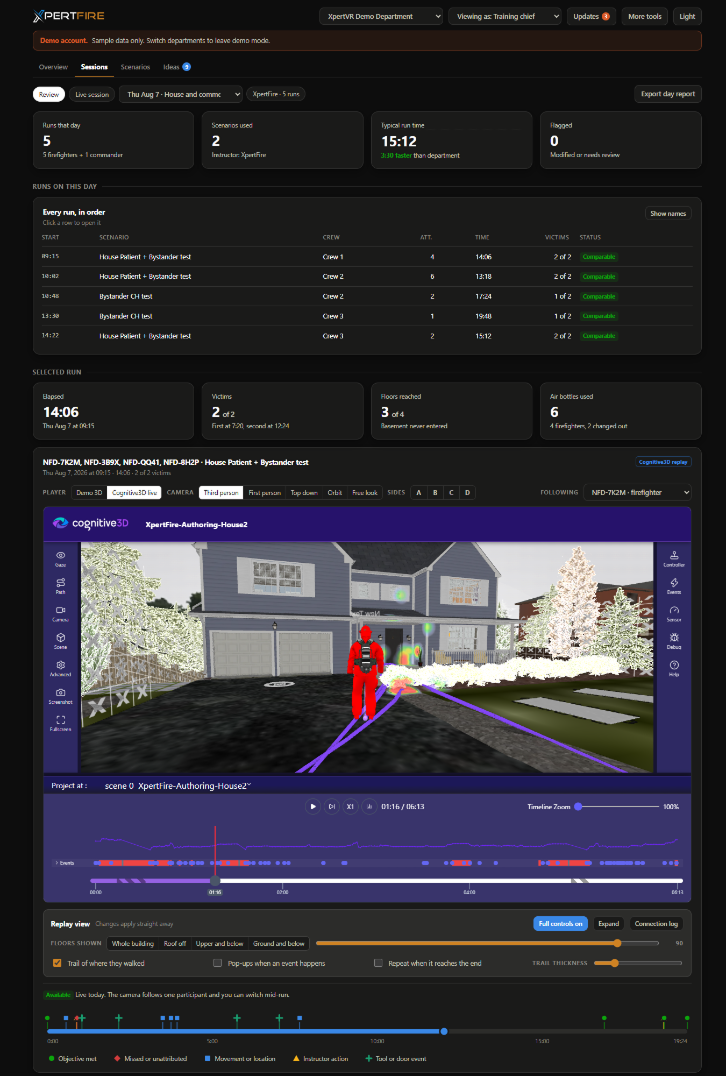
Customers and partners can now place Cognitive3D’s 3D replay experience inside their own sites, portals, internal workflows, and partner tools, bringing XR session replay directly into the places where teams already make decisions. For current customers, enterprise teams, and partners, this turns Session Replay from a destination inside the dashboard into a flexible visualization layer for customer-owned workflows. In practical terms, Session Replay is now something customers and partners can build into their own experience.
Customers and partners can now place Cognitive3D’s replay viewer inside their own sites, portals, internal workflows, and customer-facing tools, bringing XR session evidence directly into the environments where teams already review, report, and make decisions.
Why Embeddable Session Replay Matters
XR teams do not work in one tool. Training teams report outcomes in internal portals, research teams present findings to stakeholders and clients, enterprise teams share evidence with operations or executive audiences, and partners may want Cognitive3D replay to appear inside their own customer-facing experiences. When replay only lives inside one dashboard, the person who needs the evidence often has to leave their workflow to find it.
That creates friction at exactly the moment where spatial evidence should be easiest to understand. Teams either bring more people into the dashboard or fall back to a screen recording that flattens the entire session into video. A flat recording can show what appeared on screen, but it cannot preserve the same level of spatial context. It does not let reviewers move through the scene, inspect the room layout, follow gaze behaviour, compare signals against actions, or understand how dynamic objects shaped the session.
Embeddable Session Replay keeps the evidence interactive. It lets teams share 3D XR session playback where the review is already happening, without turning spatial behaviour into a static capture.
Bring 3D Session Playback Into Your Own Product or Portal
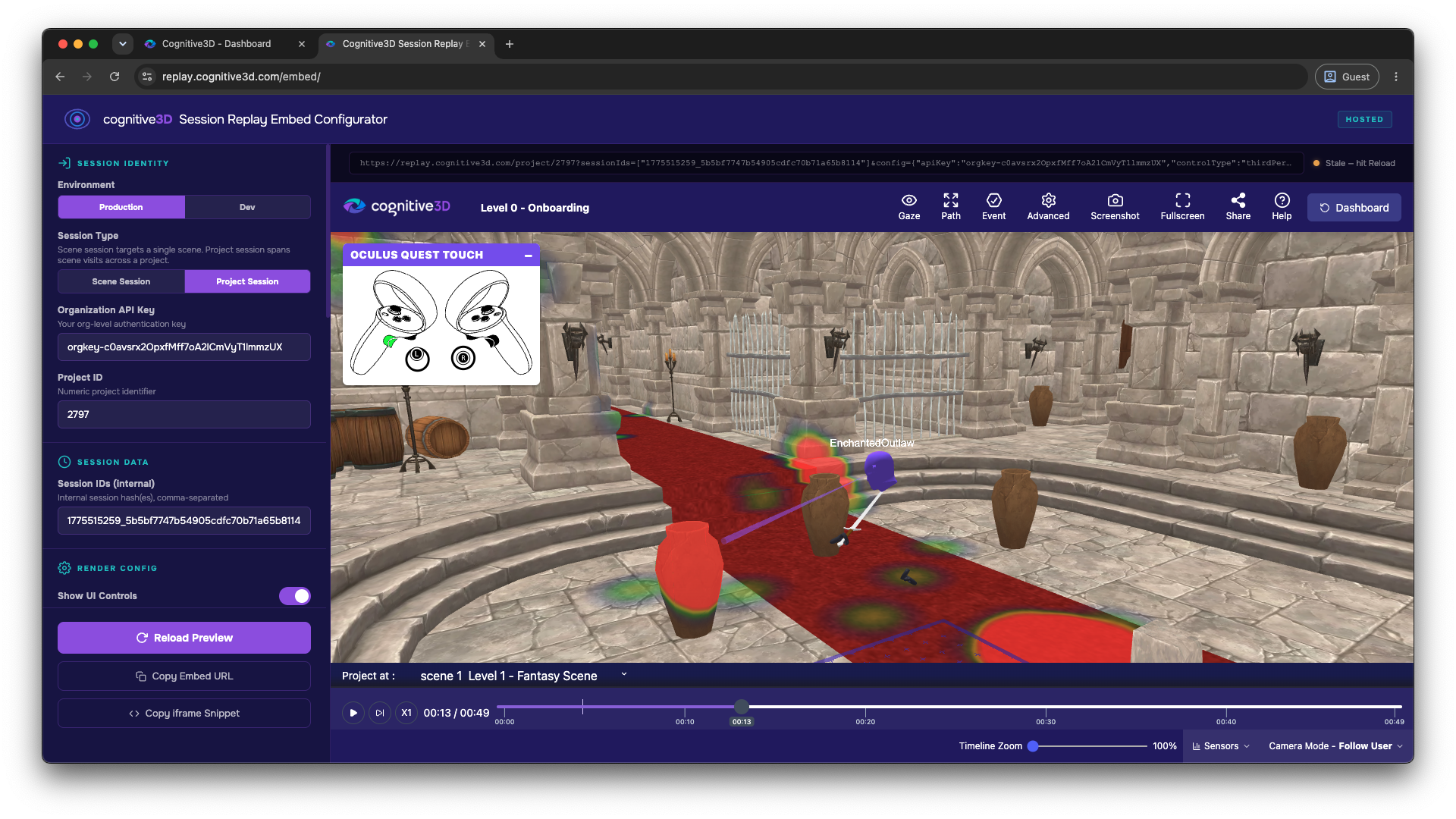
With Embeddable Session Replay, customers can generate an embed using their organization key, connecting the embedded replay experience to their Cognitive3D organization. The new SR Embed Configurator Tool generates the iframe script or direct URL needed to place the replay inside a customer-owned site, partner tool, internal portal, or other workflow where stakeholders already review XR outcomes.
The configurator is available at https://replay.cognitive3d.com/embed.
Once embedded, Session Replay can appear inside an internal reporting portal, a customer dashboard, a partner product surface, or a stakeholder review environment. This gives teams more control over how XR evidence is shared, framed, and consumed.
A training team can bring replay into a learner review workflow, a research team can embed a session alongside study notes or findings, and an enterprise customer can show spatial evidence inside a reporting environment.
For partners, the value is even broader. Cognitive3D Session Replay can become an embedded playback layer inside their own product experience, allowing them to offer interactive 3D replay to their customers without building and maintaining a visualization engine themselves. Instead of sending users out to a separate analytics dashboard, partners can keep replay inside the branded environment their customers already use, while still preserving the spatial context, gaze data, event timeline, sensor data, and object behaviour that make Session Replay useful. This helps partners extend the value of their own platforms with XR evidence that feels native to their workflow, not bolted on after the fact.
See Embeddable Session Replay in action below. This interactive example shows how Cognitive3D’s 3D replay experience can live directly inside a website, portal, or product rather than requiring viewers to leave for a separate dashboard.
Show the Room, the Gaze, and the Behaviour
Embeddable Session Replay is not just a media player. It is a 3D view of what happened in the XR session, preserving the room layout so reviewers can understand where activity happened in space. For augmented and mixed reality sessions where gaze data is captured, the replay can show gaze heatmaps that reveal what drew attention and where focus occurred.
The embedded replay can also display object fixation spheres based on the position of dynamic objects, making it easier to understand how users engaged with moving or interactive elements during the session. This matters because XR behaviour is spatial. A user’s action only makes sense when you can see where they were, what they were facing, what they looked at, what objects were present, and what happened around them.
Embedding replay keeps that context intact when the session moves outside the Cognitive3D dashboard. Instead of telling stakeholders what happened, teams can show them the spatial evidence behind the experience.
Connect Events and Sensor Data to the Moment They Happened
Embeddable Session Replay includes a chart panel for sensor and event data, keeping recorded signals visible alongside the playback. This helps reviewers connect what happened in the scene with the data captured during the session, instead of interpreting metrics in a separate report.
Event toasts appear in the bottom-left corner of the replay as notifications when tracked events occur, making the session easier to follow when reviewers need to understand the sequence of key actions, milestones, or changes during playback. For teams reviewing training, testing, research, or product experiences, this alignment is critical because it connects the recorded signal to the spatial moment that gives it meaning.
A metric on its own can tell you that something happened. A 3D replay can show you where and how it happened. Together, they create XR evidence a team can act on.
Built on SR 2.0 for More Efficient Scene Loading and Rendering
Embeddable Session Replay runs on our custom WebGL engine. It is designed to improve the efficiency of loading and rendering scenes. That matters for embedded workflows, where replay may appear inside another product, portal, or reporting environment and needs to feel lightweight, responsive, and practical for repeated review.
The release also introduces debug mode, which allows users to toggle object visibility and observe the current data stream during review. For teams validating scenes, objects, and data capture, that gives more control over how the replay is inspected. Scene Viewer and Session Replay are also brought together into the same project experience, creating a more unified place to review spatial session data.
Give Teams More Control Over Storytelling and Review
Embeddable Session Replay gives teams more control over how a session is presented. Lighting intensity now affects scene objects only, while heatmaps, sprites, and gaze paths keep their intensity even when the scene lighting changes.
This detail is important for communication because reviewers can adjust the visual clarity of the environment without washing out the behavioural layers they are trying to show. The scene can be tuned for context, while attention and movement signals remain readable. For teams presenting findings, reporting outcomes, or explaining user behaviour, Session Replay becomes more useful as a storytelling surface because it helps them show the session clearly without losing the data that makes the replay meaningful.
Extend XR Session Replay Beyond the Dashboard
Cognitive3D helps teams understand everything that happens in XR by tracking experiences, exploring individual behaviour, and analyzing aggregate insights. Session Replay sits at the centre of that story because it turns invisible user behaviour into observable evidence: how someone moved, where they looked, what events occurred, what sensor data changed, and how the experience unfolded in space.
Embeddable Session Replay extends that value beyond the dashboard by making 3D XR playback portable across customer-owned environments. Instead of keeping spatial evidence inside a single analytics interface, customers and partners can distribute replay into the portals, products, reporting tools, and stakeholder workflows where XR programs are managed.
For enterprise teams, that means replay can support internal reporting, validation, review, and stakeholder communication. For partners, it means Cognitive3D’s replay infrastructure can become part of a broader product or customer experience. For current customers, it means the session record is easier to share with the people who need to see it.
For Cognitive3D partners, this also opens a new way to extend the value of their own platforms. Embeddable Session Replay gives partners a way to bring interactive 3D XR playback into the products, portals, and customer experiences they already deliver, without having to build the replay infrastructure themselves. That means partners can offer richer session review, reporting, and validation workflows while keeping their customers inside a familiar, branded environment.
Cognitive3D’s Session Replay already helps teams understand what happened inside XR. Our Embeddable Session Replay helps that understanding travel further.
Start Using Embeddable Session Replay
Embeddable Session Replay is now generally available. Current customers can use the SR Embed Configurator Tool at https://replay.cognitive3d.com/embed to generate an iframe script or direct URL for 3D XR session playback.
Use your organization key to create the embed, then place Session Replay inside the workflow where your team, stakeholders, or customers need to review XR behaviour.
Enterprise teams and partners who want to bring 3D replay into portals, reporting workflows, or customer-facing tools can contact Cognitive3D to discuss the right implementation path.
Documentation: https://docs.cognitive3d.com/dashboard/embeddable-session-replay/
Ready To See Inside Your XR App?
Start capturing real user behaviour, app activity, and device inputs in full 3D.