Introducing Identify: Participant Authentication Built for XR


Connecting Participants to Their XR Sessions
XR can show you what happened during a session, but for enterprise training, research, and large-scale deployments, there is another question that matters just as much: Who was in the headset?
Today, we’re introducing Identify, Cognitive3D’s authentication and identity layer for XR. Identify connects XR sessions to verified participants, giving teams a way to move beyond anonymous device activity and understand who completed a session, how they performed, and how their results change over time.
Participants can authenticate through a familiar web experience and then connect their identity to the headset without having to enter enterprise credentials using an in-headset keyboard. This creates a more practical identity workflow for XR that accounts for the realities of shared headsets, enterprise authentication, and immersive input.
Closing the Identity Gap in XR
Traditional analytics often assume that the relationship between a device and its user is easy to establish. XR is different because a single headset may be used by dozens of learners across shifts, classrooms, labs, or training locations.
When sessions are associated primarily with devices or anonymous identifiers, it becomes more difficult to maintain a reliable record of the person behind each experience. This can create limitations for teams that need to review individual performance, track learning progress, compare cohorts, maintain training records, or support compliance-related reporting.
Building authentication directly into XR presents another challenge. Typing usernames and passwords with an in-headset keyboard can be slower and more error-prone than signing in on a laptop or phone. Identify was built to close this gap by separating the authentication process from the headset interaction wherever possible.
Authenticate Outside XR and Continue Inside the Headset
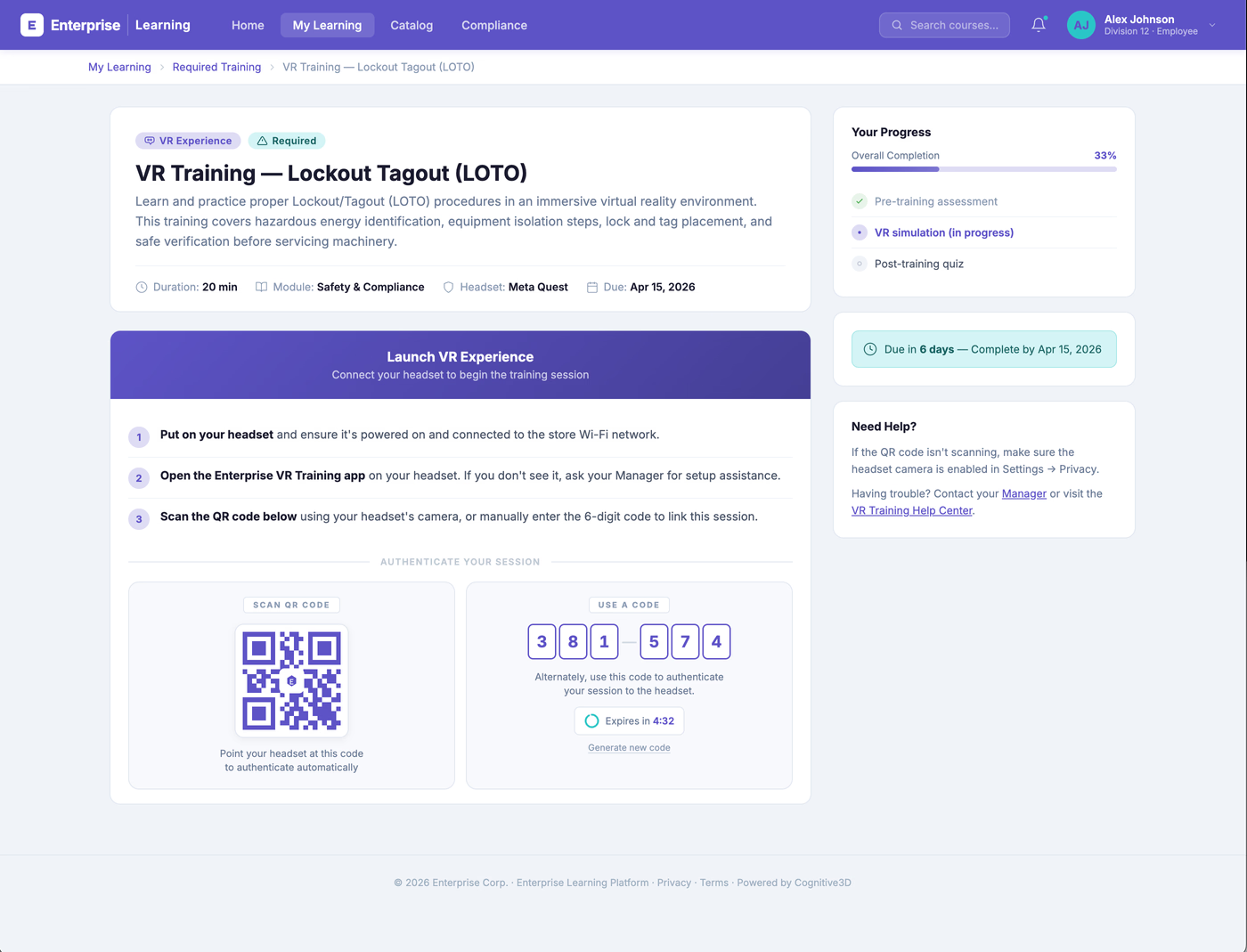
The ability to identify separates enterprise authentication from the XR interaction itself. A participant can authenticate through a branded web portal using the organization’s configured identity method, after which Cognitive3D provides a temporary pin or QR code that can be used to connect that verified identity to the XR experience.
For a standalone deployment, the participant can sign in through the organization’s authentication portal, receive a one-time pin or QR code, and then use it in the headset. For training programs using a learning management system, the same workflow can begin directly from an LMS activity. A learner can receive the authentication code within the training workflow and then scan the QR code or enter the code in XR.
By keeping authentication on devices and systems that participants already know how to use, organizations can make the transition into XR more straightforward without requiring users to enter their enterprise credentials inside the headset.
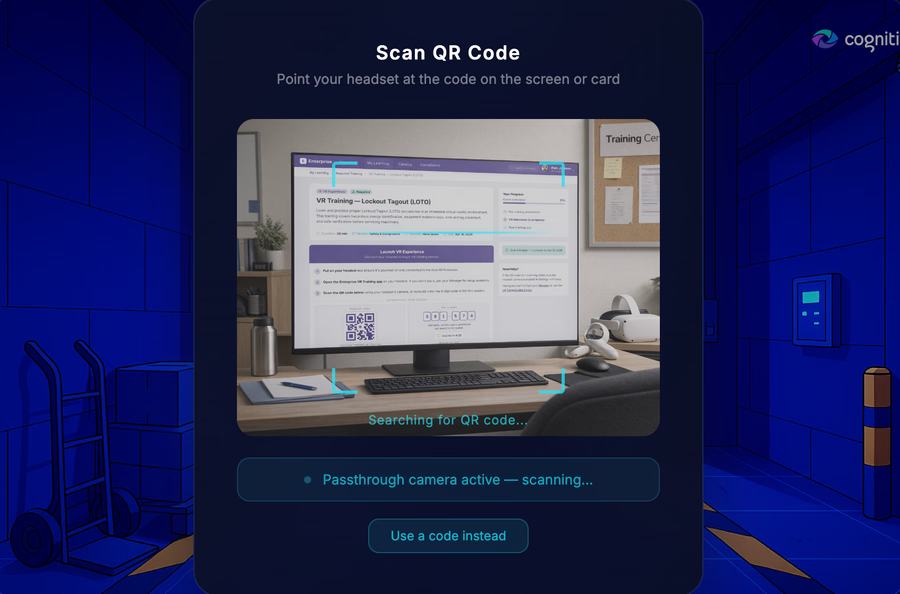
Choose the Proper Identification Method for the Experience
Not every XR environment works the same way. A supervised training session has different requirements from a self-guided experience, and some headsets provide passthrough camera access while others may require a different input method.
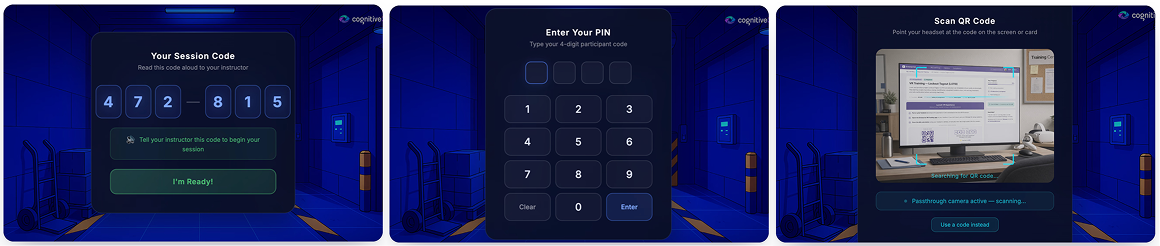
Identify supports five approaches designed around these different conditions:
- verbal codes for supervised sessions
- a VR-optimized numeric keypad
- QR scanning through a headset’s passthrough camera.
Organizations can choose the approach that best fits the security, hardware, and usability requirements of their deployment.
For Unity developers, Cognitive3D also provides an Identify sample with ready-to-configure QR, PIN, and Verbal Code panels. These components share a common panel system and can be integrated into the flow of an XR application, giving development teams a starting point rather than requiring them to build the entire headset interaction from scratch.
The Identify sample is included with Cognitive3D Unity SDK 2.5.0 and later. To get started, developers can import it directly from the Unity Package Manager by navigating to Cognitive3D Unity SDK → Samples → Identify. Once imported, the sample provides the components needed to explore and configure the available identification methods for their XR experience.
Use the Authentication Systems your Organization Already Has
Enterprise identity should not require organizations to maintain a separate XR-specific account system. Identify’s branded authentication portal is designed to work with enterprise identity workflows, including SAML and OIDC, with additional authentication options such as Google, Microsoft, and email and password supported through WorkOS.
Organizations can configure the Identify experience from Cognitive3D and customize the participant-facing launch page to better fit their environment. Brand colours and theme settings can be adjusted, and organizations can configure where participants are sent after authentication. The hosted launch page can also be embedded into another site, or teams can build a custom interface around the same Identify session workflow.
This flexibility allows authentication to become part of an organization’s existing training, research, or enterprise experience instead of feeling like a disconnected login step.
Connect XR Activity to Participant-Level Records
Authentication becomes most valuable once the XR session begins. When Identify connects a session to a verified participant, that activity can appear under the participant’s record in Cognitive3D, allowing teams to use participant identity alongside the behavioural and performance data captured during the experience.
Instead of reviewing an anonymous session in isolation, analysts can connect activity to an individual, review repeated sessions, follow learning progress, compare performance, and organize users into meaningful groups or cohorts. Training teams can establish a clearer connection between the person who completed an experience and the results generated inside it, while analysts gain another useful dimension for segmentation and benchmarking.
For enterprise teams, this provides a stronger foundation for participant-level records and reporting while preserving the spatial and behavioural context needed to understand what actually happened during the XR experience.
Bring XR Identity into your Training Stack
Identify connects XR authentication with the learning systems enterprises already use. Learners can launch an XR training workflow from an LMS and use a QR code or session code to associate their LMS identity with the headset.
Cognitive3D can also support training-data workflows through xAPI and SCORM, helping teams connect XR activity with their broader learning records. This means identity confirmation does not have to stop at the headset. Instead, it can become part of the wider workflow organizations use to manage training participation, performance, and reporting.
Support Enterprise Identity and Privacy Requirements
Identity data requires careful handling, particularly when XR is being deployed across an enterprise. Identify ties in with your organization's existing identity provider via SSO, which means Cognitive3D does not need to see or store participant passwords. The product is also designed around customer data isolation, encrypted storage, configurable retention, audit trails, and controls that can support an organization’s privacy and regional data requirements.
Organizations remain responsible for configuring authentication, privacy, retention, consent, and participant-data practices appropriately for their requirements. Identify is designed to provide a practical authentication layer that can fit into those existing controls rather than introducing another standalone identity system for XR.
Build Participant Context into Shared-Headset XR
The need for identity becomes increasingly important as XR moves from small experiments into ongoing programs. Headsets are often shared, participants may return for multiple sessions, training teams need to understand progress over time, and analysts need to distinguish one participant’s activity from another.
An anonymous device identifier alone cannot provide that participant context. By connecting an individual to an XR session, Identify gives teams a clearer way to understand who completed an experience and interpret the behavioural, spatial, and performance data captured during it.
This is particularly valuable when organizations need to review individual sessions alongside longer-term patterns. Instead of treating each headset session as an isolated event, teams can build a more complete record of how participants interact with an experience over time.
Identify is Now Available
Identify is generally available for Cognitive3D customers, with developer resources available for adding identification workflows to XR applications. For Unity projects, the Identify sample provides configurable in-headset QR, PIN, and Verbal Code workflows, along with confirmation, theming, anchoring, and event controls that developers can adapt to their experience.
With Identify, organizations can move beyond anonymous headset sessions and build participant identity into their XR workflows without forcing users through a traditional enterprise credential-entry experience inside the headset. Teams can connect each session to the person behind it and gain the participant context they need to better understand training, research, and other enterprise XR experiences.
Explore Identify and learn how to add participant authentication to your XR workflow.
Ready To See Inside Your XR App?
Start capturing real user behaviour, app activity, and device inputs in full 3D.