Introducing the Cognitive3D ROS 2 SDK: Replay and Evaluate Robot Behaviour in 3D


Robots generate a significant amount of data during every run. Logs can tell you what a system reported, sensor streams can show what a robot detected, and events can identify when something happened. But when a robot behaves unexpectedly, those individual data points do not always answer the most important question: What actually happened during the episode?
Understanding robot behaviour often requires more context. Teams need to know where the robot was, what it was doing at a particular moment, what objects or spaces were involved, what its sensors captured, and whether it ultimately completed the task successfully. They may also need to compare episodes to understand how the robot’s behaviour changed under different conditions.
A foundational part of understanding robot behaviour is being able to compare what a robot was commanded to do with what it actually did. A robot may receive an instruction to follow a particular path, move an arm into position, or complete a sequence of actions, but the resulting behaviour does not always match the intended outcome. Understanding the difference between commanded and observed behaviour is essential for identifying deviations, investigating failures, and evaluating performance. It provides the basis for determining not just whether a robot completed a task, but whether it behaved as expected throughout the process.
Cognitive3D is bringing that spatial context to robotics with our first robotics SDK for ROS 2. The Cognitive3D ROS 2 SDK allows teams to capture spatial data directly from ROS 2 robotics systems and bring it into the Cognitive3D platform safely and confidenially for replay, analysis, and evaluation. For robotics developers, integrators, and teams deploying autonomous systems, it provides a way to understand robot behaviour after an episode has finished using the spatial context in which that behaviour actually occurred.
From Robot Logs to a Spatial Record
Traditional robot logs are essential for debugging, but they can require developers to reconstruct what happened from multiple data sources. The ROS 2 SDK adds another layer of observability by recording robot activity as spatial data and bringing that information together in Cognitive3D.
Out of the box, the SDK supports a range of properties, events, and sensors commonly used in ROS 2 systems. Developers and integrators can also extend the implementation with custom properties, events, and sensors based on their own robot and application. This allows teams to build a spatial record around the information that matters to their specific system rather than being limited to a fixed analytics schema.
Once an episode is recorded, teams can explore it in Cognitive3D alongside the surrounding 3D context. This makes it possible to connect individual events and sensor readings with the robot’s movement and behaviour throughout the episode.
Replay Robot Episodes in 3D
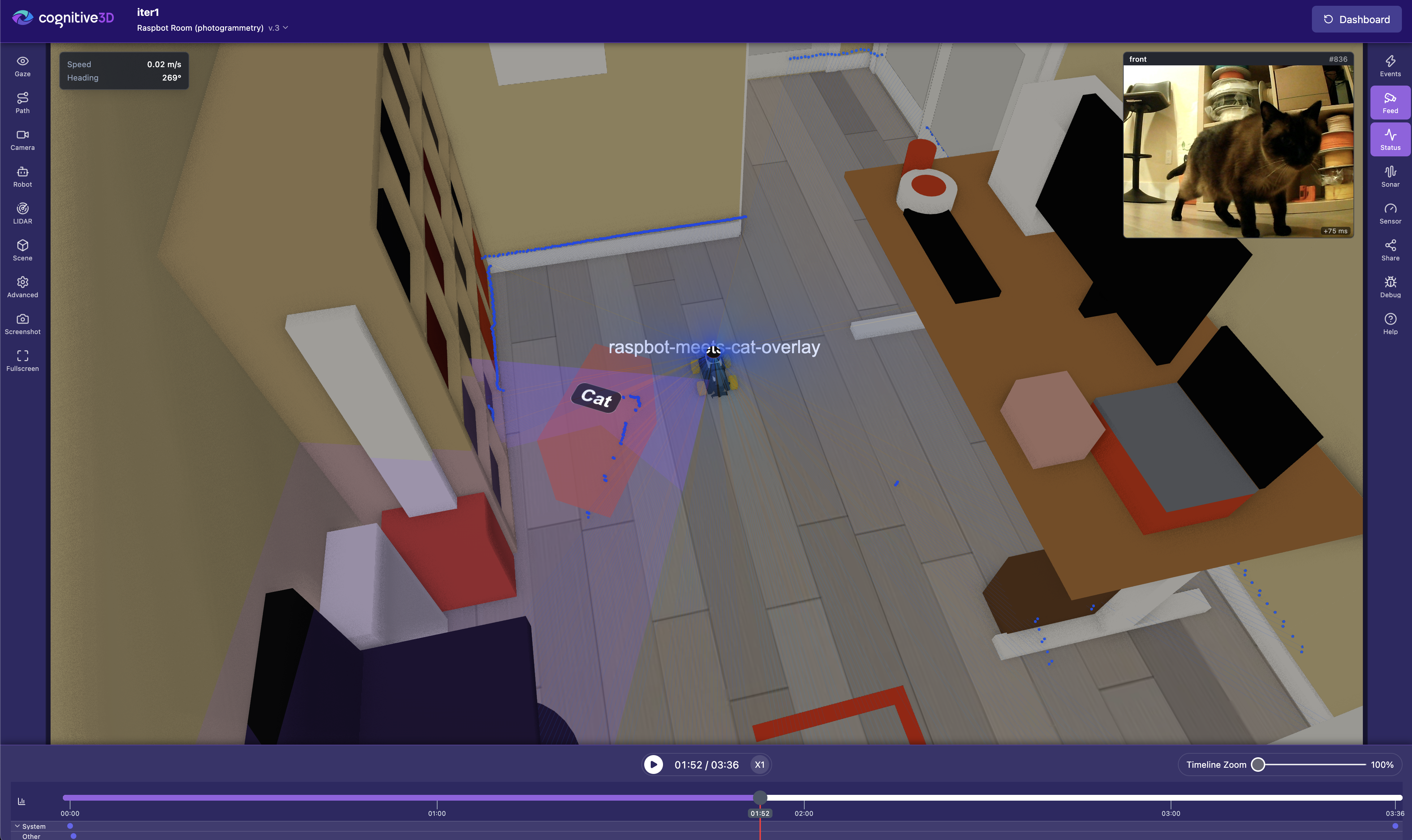
One of the most useful ways to understand a robot episode is to see it again. With Cognitive3D Session Replay, teams can play back a recorded robot episode in 3D through a web browser, giving developers a spatial representation of the robot’s behaviour rather than requiring them to interpret a sequence of disconnected log entries.
This additional context can help teams investigate where the robot was when an event occurred, what path it took through the environment, what happened immediately before a task failed, or whether it entered or avoided a particular area. Developers can also compare recorded episodes to better understand how robot behaviour changes between runs.
The goal is not to replace existing ROS 2 logging and development tools. Instead, Cognitive3D provides an additional spatial view of what happened, helping teams connect system data with the robot’s behaviour in the environment where the episode took place.
Add Camera and Sensor Context to the Spatial Record
The ROS 2 SDK also introduces camera frame capture for Cognitive3D robotics sessions. For robots equipped with cameras, developers can configure the system to capture images at selected intervals during an episode, with those frames stored alongside the spatial data recorded during the session.
This provides additional visual context when reviewing robot behaviour. For example, if an unexpected event occurs, a developer can examine the spatial replay while also referencing images captured from the robot’s camera during that episode.
Beyond camera imagery, LiDAR data can provide another important layer of spatial context by helping teams understand how a robot perceives its surrounding environment. LiDAR sensors measure distances to nearby surfaces and obstacles, providing information that can be useful when investigating navigation decisions, obstacle avoidance, and unexpected movement. When considered alongside a robot's recorded position, movement, and events, this sensor data can help teams better understand the conditions surrounding a particular behaviour.
Bringing this information together creates a richer record for debugging and evaluation without treating the robot’s physical movement, sensor data, and visual context as completely separate sources of information.
Evaluate Robot Performance with Objectives
Observability helps teams understand what happened, but robotics teams also need a repeatable way to determine whether a robot completed its task successfully. Cognitive3D Objectives can be used to evaluate recorded robot episodes against criteria defined by the team. This can include whether a particular event occurred, whether the robot entered a required space, or whether other defined conditions were satisfied.
This creates a structured way to evaluate workflows ranging from model validation to deployment testing. A team could, for example, define the conditions a robot must satisfy before a behaviour model is considered ready to move from simulation into a real-world environment. Rather than relying only on manual review, the recorded episode can be evaluated against the success criteria that matter for that particular task.
Objectives can also be changed after episodes have already been recorded. If a team’s definition of success changes, they can create or update an Objective and re-evaluate existing episode data against the new criteria. This allows teams to ask new questions of data they have already captured without having to recreate every original robot run.
Test Robot Behaviour without Redeploying your ROS 2 Application
Robotics development is iterative by nature, and teams frequently need to test different operating parameters, training conditions, or behavioural limits. Rebuilding and redeploying an application for every variation can add unnecessary friction to that process.
Cognitive3D Remote Variables and A/B testing provide a way to manage parameters exposed by the application remotely. A developer could, for example, expose values such as a robot’s maximum speed or the permitted motion range of an arm. Those values can then be changed through the Cognitive3D dashboard or API without redeploying the ROS 2 application.
This makes it possible to introduce controlled variations into robotics scenarios and evaluate how the system performs under different conditions. When combined with Objectives, teams can change the conditions of a test and then evaluate whether each variation met the required success criteria, creating a more structured approach to testing robot behaviour.
Support Calibration and Recalibration Workflows
The same approach can support operational workflows beyond initial robot development. Consider a robot that requires recalibration after a component has been replaced. Rather than treating calibration as complete simply because the procedure ran, a team can define an Objective representing the required outcome of a calibration exercise.
The recalibrated robot can then perform the exercise while Cognitive3D records the episode. The resulting data can be evaluated against the predefined conditions to help determine whether the recalibration produced the expected behaviour. This gives teams another source of evidence when deciding whether the robot is ready to return to operation.
Connect the Robot and Teleoperation Experience
The ROS 2 SDK also creates new possibilities for teams working with teleoperated robots. Cognitive3D already provides spatial data SDKs for platforms including Unity, Unreal, and WebXR, which means teams can instrument both the application used by the operator and the robot being controlled.
If a teleoperation application is instrumented with another Cognitive3D spatial data SDK while the robot itself is instrumented through ROS 2, teams can capture the teleoperation session alongside the concurrent episode recorded by the robot. This provides additional context when investigating how activity within the operator experience relates to the resulting behaviour of the robot.
For teams building and evaluating remote robotics workflows, connecting these perspectives can make it easier to understand an episode as a complete interaction rather than examining the operator and robot as entirely separate systems.
Built for the Way Robotics Teams Work
ROS 2 supports a broad range of robots, sensors, and applications, so the Cognitive3D SDK is designed with that extensibility in mind. Teams can begin with supported properties, events, and sensors, then extend the implementation with the data that matters to their own robot and use case.
The result is more than another source of logs. It is a spatial record of a robot episode that teams can replay, inspect, measure, and evaluate.
For developers, that can provide better context when debugging behaviour. For robotics teams, it can support more structured evaluation of models, scenarios, and calibration exercises. For organizations moving robots from development and simulation toward real-world deployment, it provides another way to build evidence around a fundamental question.
Ultimately, all of this helps teams answer one of the most important questions in robotics: Did the robot actually do what we expected it to do? By preserving the context as a spatial record, teams have a clearer way to investigate unexpected behaviour, evaluate performance, and build evidence around whether a robot is ready for its next stage of testing or deployment.
The Cognitive3D ROS 2 SDK is now available
The ROS 2 SDK is Cognitive3D’s first live robotics SDK and is generally available. Teams developing, testing, or deploying robots with ROS 2 can now bring robot episodes into Cognitive3D to capture spatial data, replay behaviour in 3D, evaluate outcomes, and investigate what happened during each run.
If your team is working with ROS 2 and wants to understand robot behaviour in greater spatial context, get a demo and talk to our team about instrumenting your first ROS 2 robot episode.
Ready To See Inside Your XR App?
Start capturing real user behaviour, app activity, and device inputs in full 3D.