From Dashboard to Slack: Automate XR Reporting with Cognitive3D


Automate the Path from XR Insights to Action
Your XR analytics are most useful when the people who need them can see them at the right time.
Keeping stakeholders informed often means repeating the same reporting workflow: open a dashboard, review the latest results, prepare an update, and send it to the right people. Then do it again next week or next month.
With Report Subscriptions in Cognitive3D, that process can now be automated.
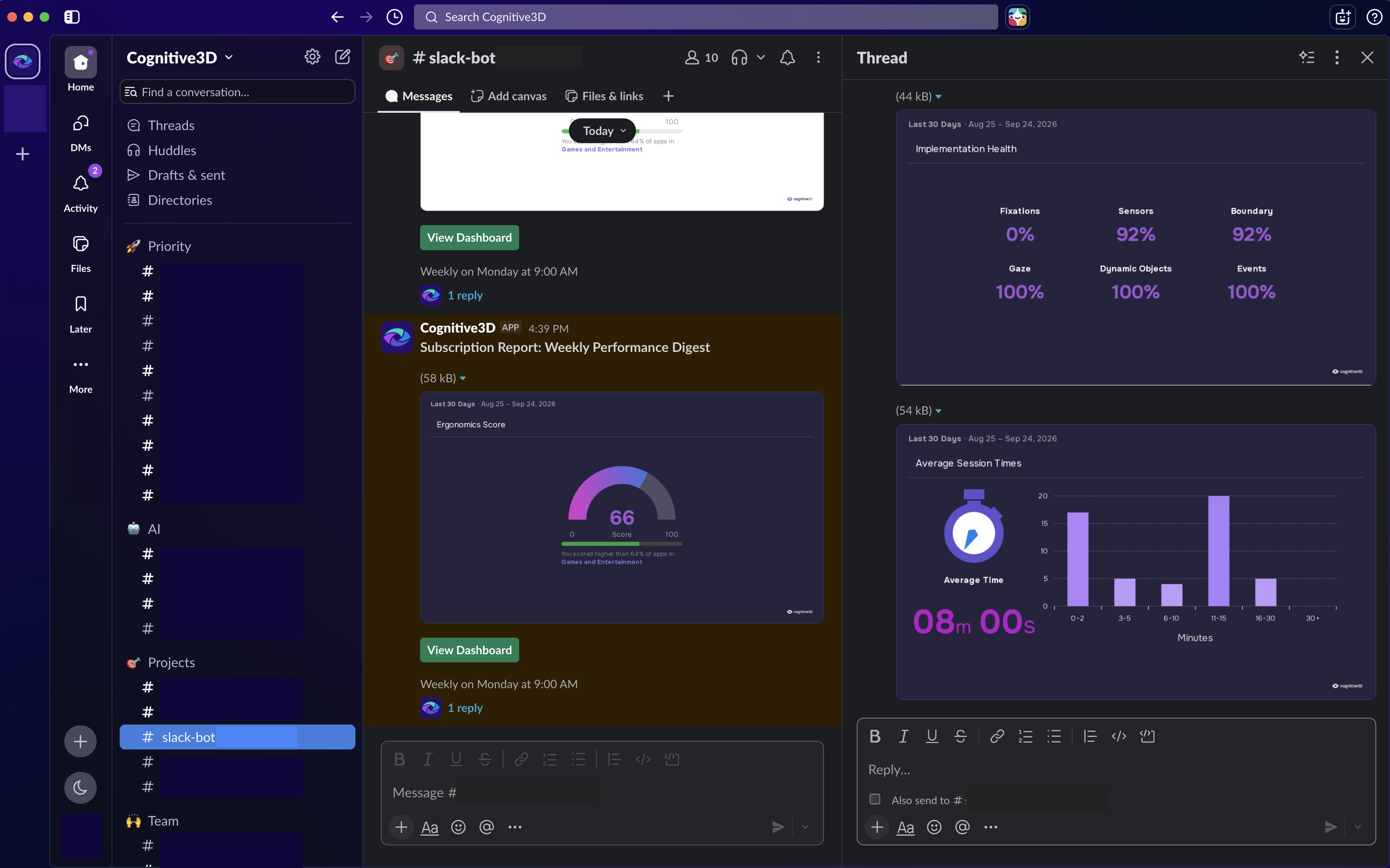
You can select a Cognitive3D dashboard, choose where the report should be delivered, and set a daily, weekly, or monthly schedule. Cognitive3D will automatically send the dashboard report, including its charts, to your selected Slack channels or email recipients.
The result is a simpler way to keep XR analytics visible without manually producing and distributing every update.
Bring XR Reporting into Slack
Teams already use Slack to coordinate projects, review progress, and make decisions. XR reporting should be able to fit into that workflow too.
With the new Cognitive3D Slack integration, dashboard reports can be delivered directly into the channels where your team is already collaborating. Instead of relying on someone to remember to share the latest dashboard, your team can establish a recurring reporting cadence once and let Cognitive3D handle delivery.
A team reviewing an active XR project might want an update every day. Other stakeholders may only need a weekly summary. Leadership or external collaborators may prefer a monthly report by email.
Report Subscriptions give you the flexibility to match reporting frequency and destination to the people consuming the data.
Why We Built Report Subscriptions
Creating a dashboard is only part of the reporting workflow. The next challenge is making sure the right people actually see it.
For many teams, that still means manually sharing the same reports on a recurring basis. Each update needs to be produced, sent, and posted to the appropriate stakeholders or channels. It is a small task individually, but it becomes repetitive quickly.
This release responds to a recurring customer need: make it easier to keep teams informed without manually distributing the same reports again and again.
Once a Report Subscription is configured, Cognitive3D handles recurring delivery. Your team gets consistent access to the latest reporting while spending less time managing the reporting process itself.
How Report Subscriptions work
Setting up recurring reporting takes a few steps:
- Choose your dashboard. Select the Cognitive3D dashboard you want your team or stakeholders to receive.
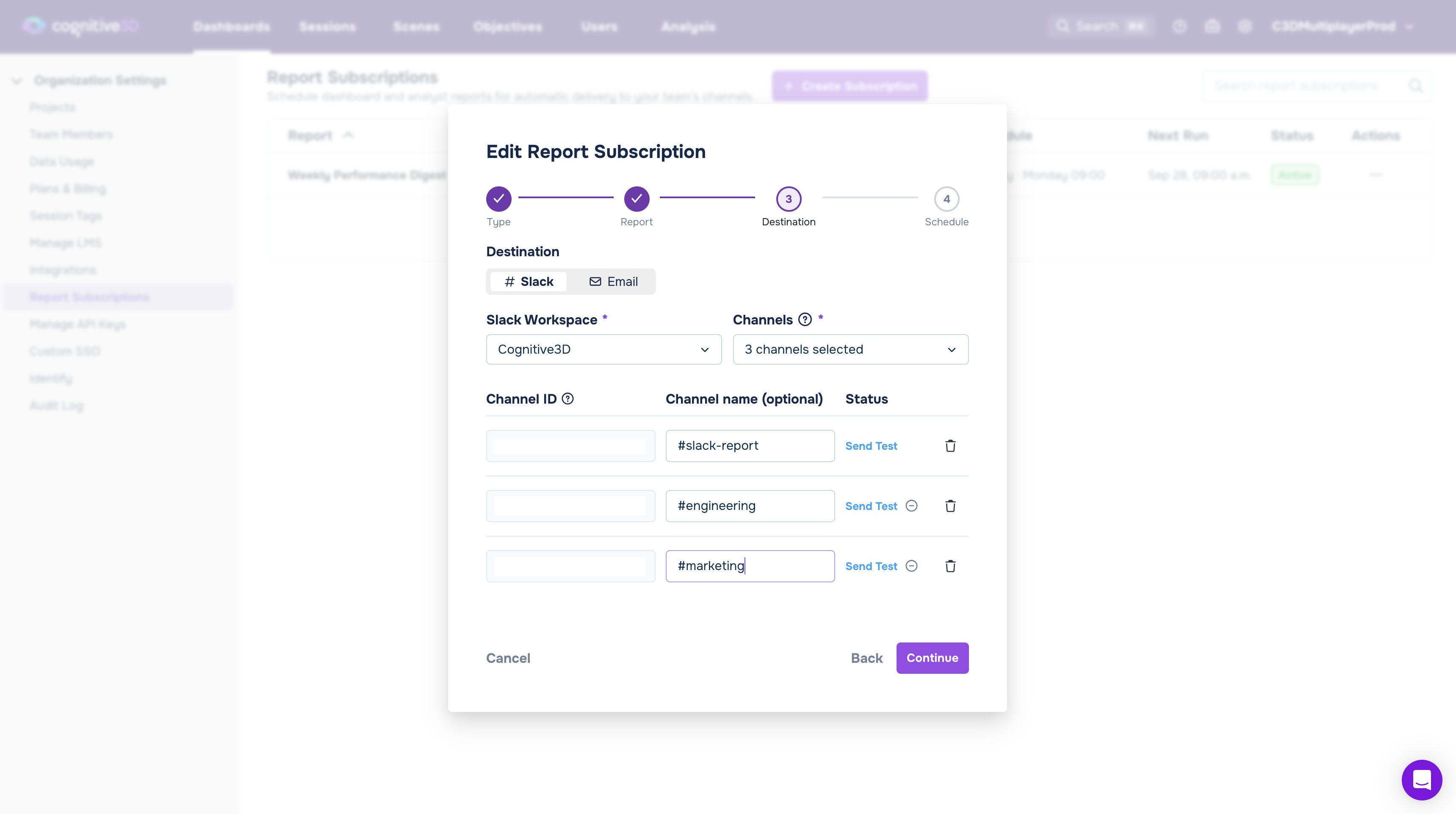
- Choose where it should go. Send the report to selected Slack channels or email recipients. For Slack delivery, you only need to connect your Slack workspace to Cognitive3D once. Public and private channels are supported as long as the Cognitive3D app has been invited to the channel.
- Set your reporting cadence. Choose daily, weekly, or monthly delivery, then configure the time and timezone that works for your team.
- Confirm your setup. A built-in test send lets you verify that the selected Slack channel is configured correctly before activating the subscription.
Once the subscription is active, Cognitive3D automatically delivers the dashboard report, including its charts, according to your schedule.
Make Analytics Part of the Team’s Workflow
Automated reporting changes more than how a report gets delivered, it changes how easily analytics can become part of an ongoing workflow.
Better visibility. Reports arrive automatically in the Slack channels or inboxes where stakeholders already work. Teams do not have to remember to visit another tool just to check whether new reporting is available.
More consistent reporting. Daily, weekly, or monthly subscriptions create a predictable reporting rhythm. Once configured, each report is delivered without someone manually sending it.
Analytics closer to the conversation. When a dashboard report appears directly in Slack, the data and the discussion around it can happen in the same place. Teams can review results alongside the projects and decisions those results inform.
For organizations with multiple teams or Cognitive3D organizations, the integration is also designed to support broader deployment. A single Slack workspace can be connected to multiple Cognitive3D organizations, helping teams establish reporting workflows without requiring a separate Slack workspace connection for each one.
Reporting that matches the way your team works
Different stakeholders need different levels of visibility into XR analytics.
A project team might want frequent updates in a shared Slack channel. A stakeholder group might prefer a weekly report. An executive or external collaborator may only need a monthly email. These audiences should not require completely separate manual reporting workflows.
Report Subscriptions let you use the dashboards you already create in Cognitive3D and establish the delivery schedule that makes sense for each audience. Thais means the people actively working with XR data can stay close to the analytics, while other stakeholders can receive regular updates without needing to monitor Cognitive3D themselves.
It also makes reporting more repeatable. Instead of relying on an individual to remember when a report needs to be sent, the reporting cadence becomes part of the workflow.
Getting Started with Slack Reporting
To start delivering Cognitive3D reports through Slack, connect your Slack workspace and invite the Cognitive3D app to the channels where reports should appear.
That second step is important. The Cognitive3D app must be invited to a Slack channel before it can deliver reports there, including private channels.
You can then use the test send option to confirm that everything is connected correctly before creating your recurring subscription.
From there, choose your dashboard, recipients, cadence, time, and timezone. Cognitive3D will take care of the recurring delivery.
For teams that prefer email, Report Subscriptions can also send dashboard reports directly to selected email recipients.
Spend Less Time Distributing Reports and More Time Using Them
XR analytics should help teams understand what is happening inside an experience and make informed decisions about what to do next. Getting those insights in front of the right people should not become another recurring manual task.
With Slack integration and Report Subscriptions, Cognitive3D brings dashboard reporting closer to the places where teams already communicate, giving stakeholders consistent access to XR analytics while reducing the work required to distribute them.
If you are already using Cognitive3D, you can start building recurring reporting workflows with your dashboards and connect Slack when you are ready to deliver reports directly to your team.
If you are evaluating Cognitive3D, book a demo to see how dashboards, XR analytics, and automated reporting can fit into your team’s workflow.
Ready To See Inside Your XR App?
Start capturing real user behaviour, app activity, and device inputs in full 3D.