The New Query Building Agent: Making Advanced Analysis Easier to Explore


A Faster Way to Build XR Analytics Queries
Open the Advanced Analysis page in Cognitive3D and type:
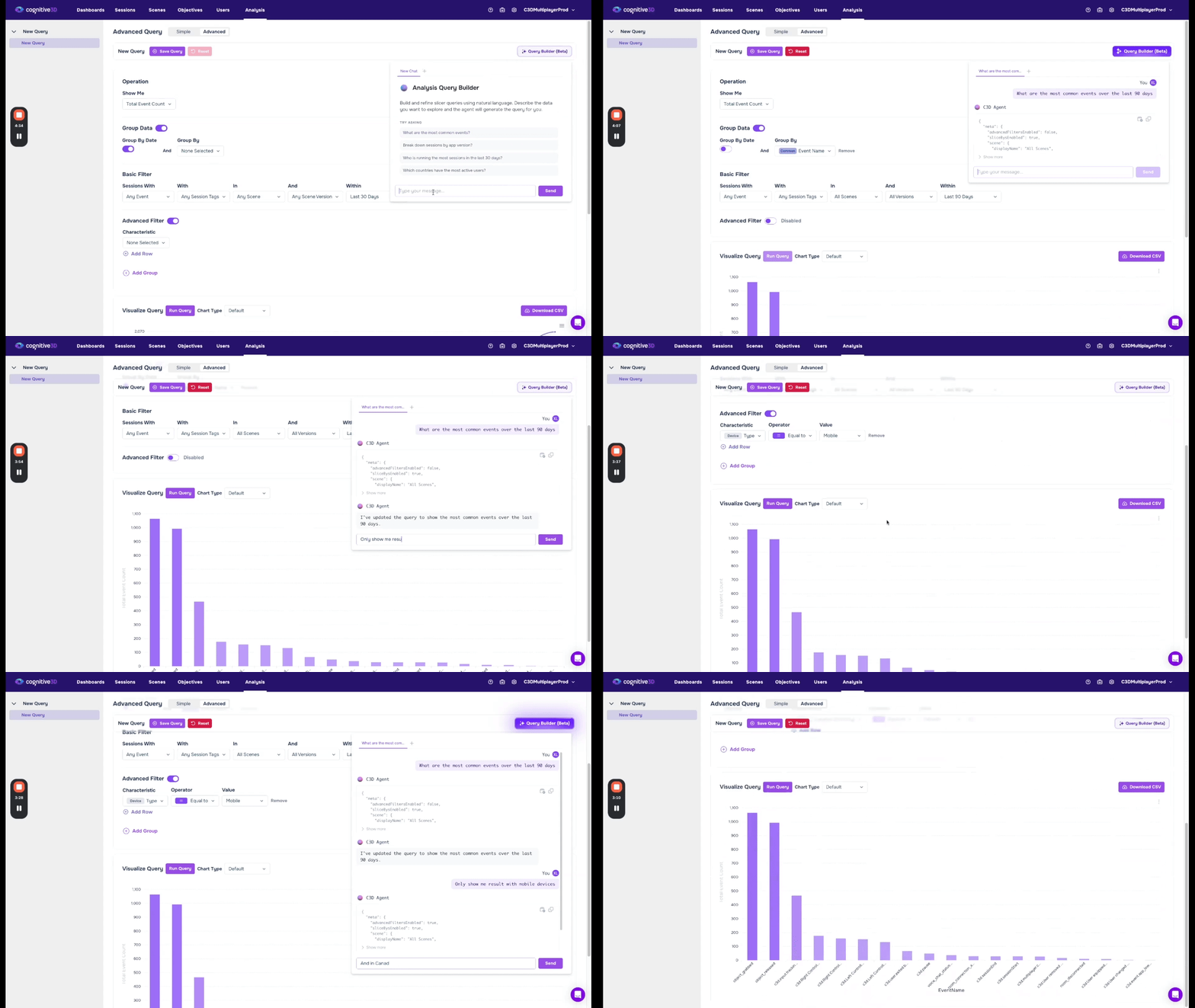
“Most common events for Android users this week.”
The new Query Builder Agent processes the request, asks a quick clarification: “Android Mobile or Android XR?”, and then automatically fills in the Analysis workflow. The appropriate scene, version, event, filters, breakdowns, aggregation, and date range are selected, and the chart appears seconds later. No manual slicer configuration is required.
That experience is the foundation of the new Analysis Query Builder Agent, a natural-language query interface embedded directly into the Advanced Analysis page in the dashboard.
The feature is intentionally focused in scope. It is not designed as a general-purpose chatbot or open-ended AI assistant. Instead, it is purpose-built to help users construct valid analysis queries using natural language while remaining grounded in the actual schema and data available inside the active project.
What makes this workflow particularly useful is that the agent operates against real project structure rather than generic examples. It references existing events, properties, scenes, versions, and filter values within the active environment, to construct queries that align with how experienced users would manually configure the analysis page themselves.
The Query Builder Agent functions as an access and acceleration layer on top of Advanced Analysis, rather than a separate AI analytics system. The underlying analytics workflow remains the same. What changes is how quickly users can move from intent to a usable chart.
Why Advanced Analysis Needed This
Advanced Analysis is one of the most powerful analytics surfaces in Cognitive3D, but it is also one of the most technically demanding.
Historically, answering even relatively straightforward behavioural questions required users to understand the underlying schema in significant detail before they could begin exploring data effectively. Building a query often depended on knowing the exact event name, the precise property schema, the correct scene or version scope, the appropriate aggregation method, and the exact formatting of filter values.
Even small inconsistencies could break a query silently. Typing android instead of Android, selecting a property unavailable within a particular scene, or choosing the wrong aggregation could result in incomplete data, misleading charts, or empty results with little explanation as to why the query failed.
Experienced users eventually became efficient at navigating these constraints, but the workflow still introduced unnecessary operational overhead. More importantly, it created a dependency on schema familiarity that limited broader self-serve analytics adoption across organizations.
In practice, many non-analyst stakeholders still relied on internal experts to answer relatively routine questions. Product managers, customer success teams, operations leaders, and executives often needed assistance simply because the process of constructing the query itself required platform-specific knowledge.
The Query Builder Agent reduces that dependency significantly by allowing users to begin with intent instead of configuration mechanics.
Historically, self-serve analytics has still depended heavily on internal schema expertise. The Query Builder Agent reduces that dependency substantially by allowing users to describe the question first and letting the platform construct the query around it.
Moving From Configuration-First to Intent-First Analytics
The most important shift introduced by the Query Builder Agent is not simply speed, it is a change in how users approach analytics workflows altogether.
Previously, Advanced Analysis followed a configuration-first model. Before users could investigate data, they first needed to manually assemble the structure of the query itself. That meant selecting scenes, choosing events, applying filters, configuring slice-bys, selecting aggregations, and defining date ranges before a chart could even render.
For experienced analysts, that process became familiar over time. However, even for power users, it still introduced repetitive setup work that slowed exploration. For newer users or cross-functional stakeholders, the workflow often felt procedural and intimidating before meaningful analysis could even begin.
The Query Builder Agent introduces a more intent-first workflow.
Instead of starting with configuration, users can begin by describing what they want to understand.
Questions such as: “Compare objective completion rates between Quest and Pico users over the last 30 days.” or “Which scenes had the highest replay activity after the latest release?” can now generate fully structured analysis queries automatically.
The slicer interface still plays an important role in the workflow, but its purpose changes significantly. Rather than serving as the primary mechanism for manually constructing every query from scratch, it becomes a refinement layer where users can review, modify, and expand queries that the agent has already assembled.
That distinction has a meaningful impact on how people use analytics tools.
When analytics workflows require substantial setup effort, users naturally become more selective about which questions are worth exploring. Reducing that operational overhead changes the interaction model entirely. As queries become faster to generate, analysis becomes more iterative and exploratory.
Schema Awareness and Clarifying Questions
One of the most valuable aspects of the Query Builder Agent is its awareness of the actual schema inside the active project.
Many analytics failures are not caused by bad questions. They are caused by mismatches between the query and the underlying schema. A filter value may be misspelled, an event may no longer exist in the current version, or a property may only exist within certain scenes.
Traditionally, users needed to troubleshoot those issues manually, often through trial and error.
The Query Builder Agent validates requests against real project structure during query construction, which allows it to surface issues before the query is generated.
If a request references an ambiguous value, the system asks for clarification instead of guessing. For example, a query referencing “Android users” may prompt the user to specify whether they mean Android Mobile or Android XR. Similarly, broader behavioural requests such as “sessions where users got stuck” may require clarification around what stuck means operationally within the context of the query.
That clarification layer is intentional and central to how the system maintains reliability.
The agent is designed to avoid silent substitutions or hidden assumptions. Instead of attempting to infer meaning automatically, it surfaces ambiguity directly and asks for confirmation before constructing the query. The clarifying exchange is part of the feature, not friction.
Faster Time to First Insight
The most immediate benefit of the Query Builder Agent is the reduction in time required to generate a usable chart. Tasks that previously involved a minute or more of slicer configuration can now often be completed in a few seconds through natural-language input alone.
However, the larger impact is behavioural rather than purely operational.
When generating a chart requires significant setup effort, users tend to limit how many questions they investigate. Each additional query introduces friction, which naturally reduces experimentation and exploration.
As that friction decreases, user behaviour changes. Teams begin asking more follow-up questions, testing more hypotheses, and exploring data more dynamically because the cost of iteration becomes substantially lower. Instead of carefully planning a single query, users can move through multiple variations rapidly while investigating trends, anomalies, or behavioural changes.
That shift affects different teams in different ways.
A product manager preparing a weekly training report can quickly compare completion rates across modules without repeatedly rebuilding slicer configurations. An executive investigating an unexpected engagement spike can validate trends independently without waiting for analyst support. A customer success manager reviewing declining usage patterns can explore session behavior during an active customer conversation and immediately investigate follow-up questions while the context is still fresh.
The Query Builder Agent does not replace analytical judgment or interpretation. Teams still need context and expertise to understand what the data means and how to act on it. What changes is the speed at which users can move from curiosity to a usable visualization that helps frame the next question.
Why a Scoped Agent Works Better Here
The Query Builder Agent is intentionally constrained to the Advanced Analysis workflow, and that design choice is part of what makes the feature reliable.
General-purpose AI systems are often designed to handle an extremely broad range of requests, but broad capability frequently introduces inconsistency. For analytics workflows, reliability and transparency matter more than conversational breadth.
The Query Builder Agent focuses on a specific problem: translating user intent into correctly structured Analysis queries using valid project schema and available data.
It does not attempt to generate autonomous insights, summarize unrelated information, or operate outside the analytics workflow. Every query it constructs remains fully visible and editable within the existing Analysis interface.
Importantly, the underlying analytics model itself has not changed. The same schema, datasets, and analysis visualizations still power the workflow. What changes is the operational distance between user intent and a fully constructed query.
Because the agent operates within a clearly defined surface area, users can inspect exactly how queries are constructed, validate the logic directly inside the slicer, and maintain visibility into every filter, aggregation, and breakdown applied to the chart. Nothing runs invisibly, and ambiguous requests are clarified before execution rather than silently inferred.
The result is an experience that accelerates access to analytics without obscuring how the underlying workflow operates.
A general chatbot can answer almost anything almost adequately. A scoped agent can solve a very specific class of problems reliably.
For analytics on customer data, that tradeoff matters.
Try It Today
If you are already using Cognitive3D, open the Advanced Analysis page and type the first question that comes to mind. The Query Builder Agent is available directly inside the existing workflow and works against your current project schema and data.
If you are evaluating Cognitive3D for XR analytics, book a demo to see the Query Builder Agent running against real project data and experience how quickly the workflow moves from question to visualization.
Ready To See Inside Your XR App?
Start capturing real user behaviour, app activity, and device inputs in full 3D.