Explore Recorded XR Sessions: From Replay to Real Behavioural Insight


The Full Story of Every XR Session Is Now Accessible
Every XR session tells a story. Not just a result, but a sequence of actions, decisions, and reactions that unfold in real time. Users move through space, shift their attention, interact with objects, and respond to the environment in ways that reflect both the design of the experience and their own understanding of it. That story contains the signals teams need to improve what they build, if they can actually see it, but most teams never see that story in full.
Instead, they rely on fragments. A completion rate, a timestamp, or a survey response. These are useful, but they are not the experience itself. They are abstractions of what happened, not the reality of it.
Recorded sessions change that by preserving the full experience, not just the outcome. Instead of losing visibility the moment a session ends, teams can return to it, step through it, and examine what happened in context. And just as importantly, they can access every session in one place, where each experience is not only replayable, but organized, searchable, and ready to be explored.
Where XR Data Becomes Difficult to Navigate
XR experiences are inherently rich because they combine movement, interaction, attention, and spatial context into a single environment. Users are not clicking through screens. They are navigating space, making decisions in context, and engaging with objects as part of a continuous experience. That complexity is what makes XR powerful, but it also means traditional analytics fall short without a way to see what actually happened.
When you cannot revisit a session, the experience becomes invisible the moment it ends. But even when sessions are recorded, a different problem often appears. The data exists, but it is difficult to organize, search, and access in a meaningful way.
Teams may have hundreds or thousands of recorded sessions, but locating the right one becomes a manual process. A learner fails a task, but their session is buried in a list. A pattern is suspected, but there is no easy way to filter sessions by user type, scenario, or behaviour. The friction is no longer about collecting data. It is about finding and using it.
As a result, review processes slow down, insights are delayed, and the value of recorded sessions is limited not by what they capture, but by how easily teams can explore them.
From Outcomes to Behaviour
Most XR teams begin by measuring outcomes because they are easy to define and report. Completion rates, task times, and success metrics provide a clear signal of performance. But these metrics often hide important variation in how users reach those outcomes, making it difficult to understand where experiences break down or how they can be improved.
Two users can reach the same result in completely different ways. One may move efficiently and confidently, while another hesitates, backtracks, or struggles along the way. If you only measure the outcome, those differences disappear.
Recorded sessions restore that missing layer by showing the full path users take. And when those sessions are organized into a structured view with key details visible at a glance, teams can quickly identify which sessions are worth investigating. Instead of searching blindly, they can move directly to the moments that matter.
This is where behaviour becomes not just observable, but actionable.
What It Means to Explore Recorded Sessions
Exploring recorded sessions is more than pressing play on a replay. It is the ability to move through XR data in a structured and flexible way, depending on the question you are trying to answer.
At the foundation is a unified session view. All recorded sessions are accessible in one place, across users, environments, or profiles. Each session is accompanied by key metadata such as session ID, duration, date, time, and tags, allowing teams to quickly scan and understand what they are looking at before even opening a replay.
From there, exploration becomes dynamic. Teams can narrow down sessions using filters, isolating specific user groups, scenarios, or timeframes. They can open individual sessions to observe behaviour in detail, then return to the broader dataset to compare what they saw against other sessions.
This ability to move between overview and detail is what makes exploration effective. You are not just watching sessions, you are navigating a dataset of behaviour.
And when needed, that dataset does not stop inside the platform. Sessions and their underlying data can be exported, allowing teams to run deeper analysis, integrate with other systems, or apply AI-driven workflows that extend beyond the initial replay.
Exploring XR Data Beyond Replay
Replay is often the starting point, but it is not the only way to understand XR behaviour. As teams work with more sessions and more complex questions, they need different ways to navigate and interpret their data.
Cognitive3D supports this by enabling multiple modes of exploration, each designed to answer a different type of question.
1. Session-Level Exploration
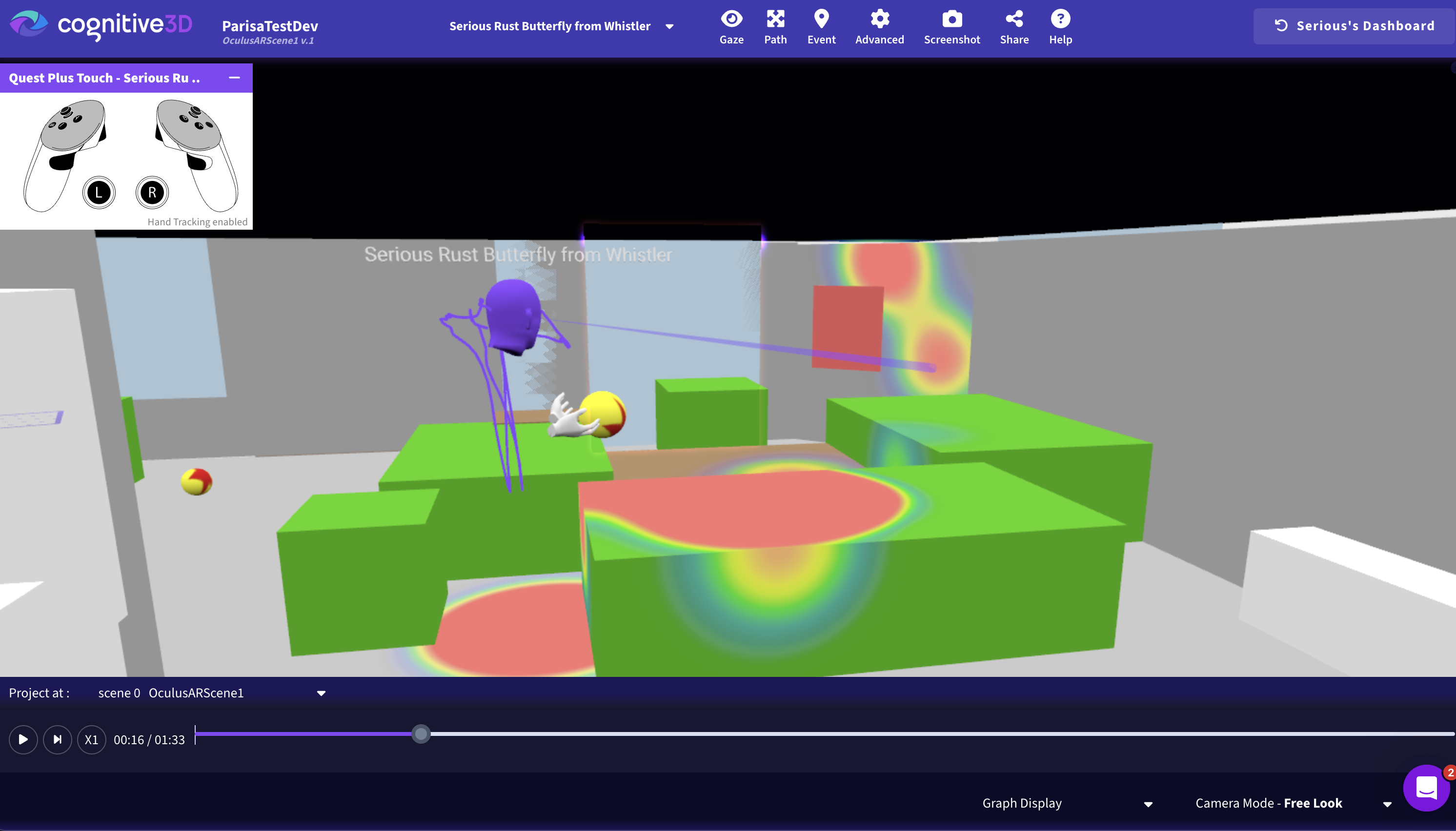
Session-level exploration begins with a single recorded experience. This is where teams step into a session and observe behaviour as it unfolded, moment by moment. By replaying the session in 3D, they can follow the user’s movement through space, track where attention was directed, and see how interactions occurred in context.
This level of exploration is essential when investigating specific issues. It allows teams to understand not just what went wrong, but exactly how it happened. Moments of hesitation, confusion, or error become visible in a way that metrics alone cannot capture. It is the closest representation of the actual user experience.
2. Filtered Exploration
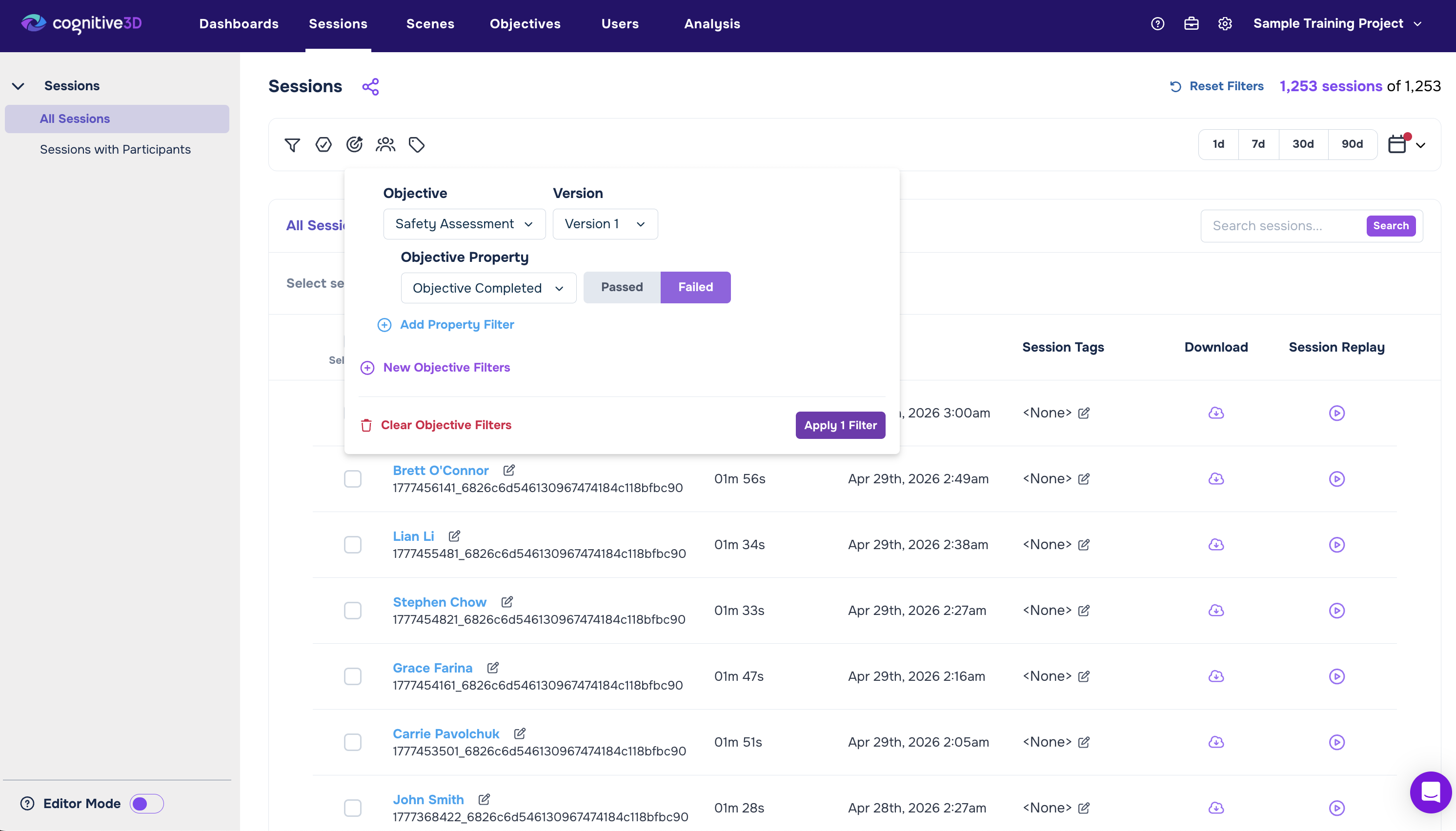
Filtered exploration allows teams to move beyond individual sessions and isolate meaningful subsets of data. Instead of manually searching through a long list of recordings, teams can apply filters based on user properties, tags, environments, scenarios, or time ranges.
This makes it possible to quickly locate sessions that match a specific condition. For example, teams can isolate sessions from a particular training cohort, focus on a specific scenario, or identify sessions where a certain outcome occurred. What would otherwise take hours of manual review becomes a fast, targeted process.
Filtered exploration turns a large collection of sessions into something navigable. It allows teams to move directly to relevant data instead of working through everything.
3. Comparative Exploration
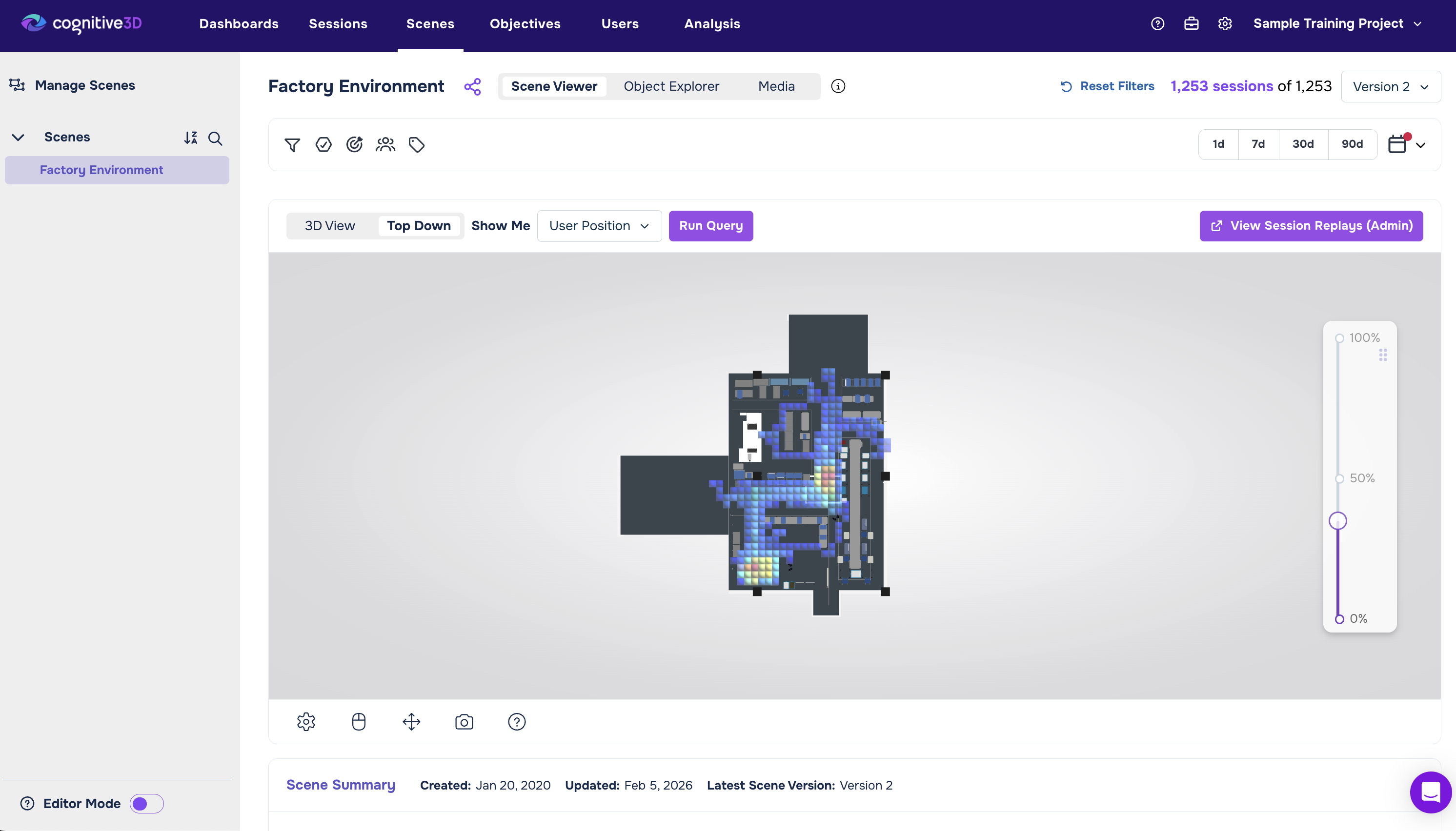
Comparative exploration focuses on understanding patterns across multiple sessions. Instead of looking at one experience in isolation, teams examine how behaviour varies across users, groups, or versions of an experience.
This is where deeper insights begin to emerge. Teams can compare how different users approach the same task, identify consistent points of friction, or evaluate how changes to an environment impact behavior over time. Patterns that are invisible at the individual level become clear when viewed across multiple sessions.
This mode of exploration is critical for validating improvements and identifying systemic issues. It shifts the focus from individual cases to repeatable trends.
4. Data Extraction and Extended Analysis
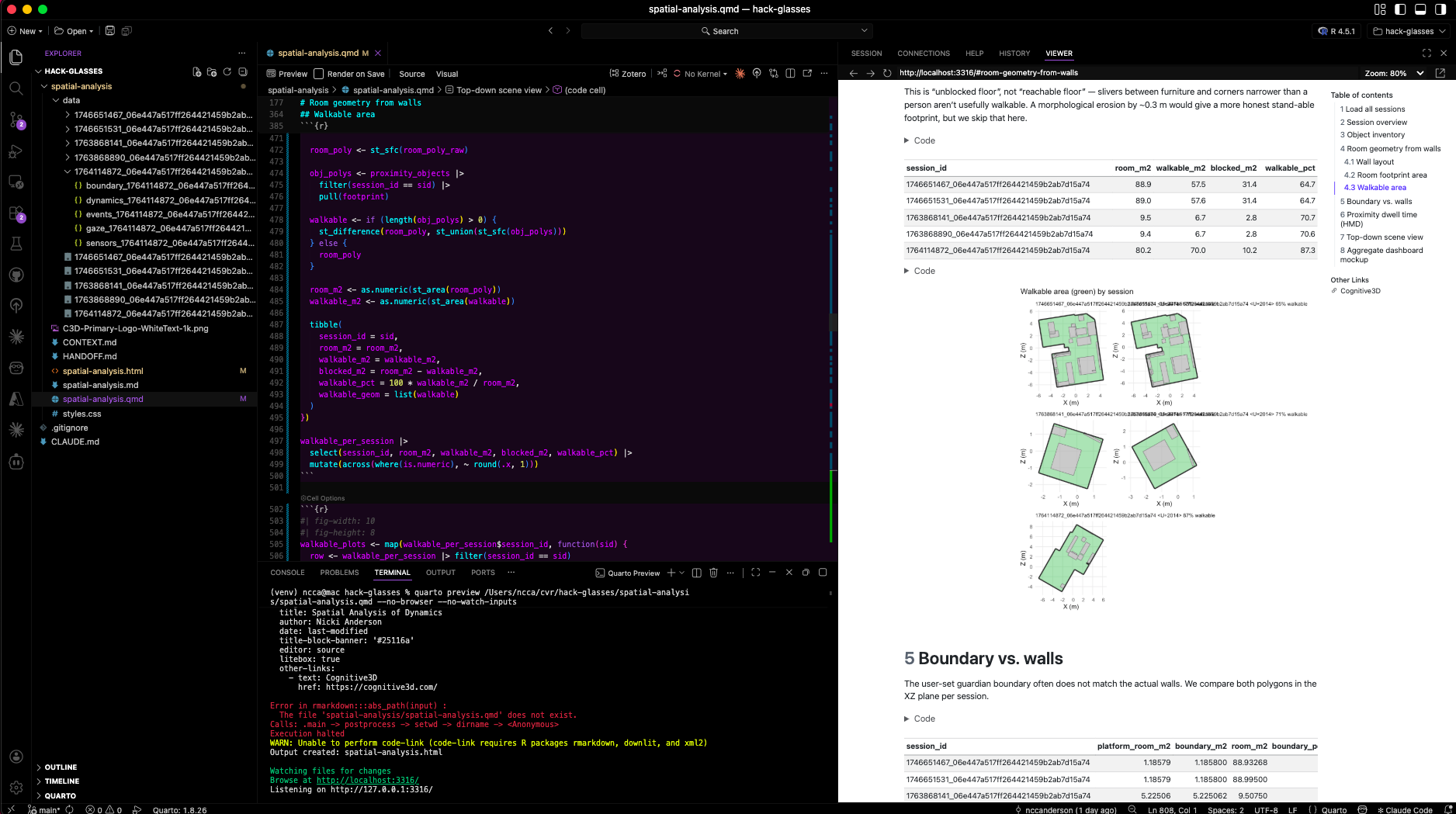
In some cases, exploration needs to go beyond what is immediately visible in replay or dashboards. Data extraction allows teams to export session data and use it in external workflows, including deeper statistical analysis or AI-driven processing.
This is especially valuable when working with large datasets or when integrating XR data into broader analytics systems. Teams can combine session data with other sources, run custom queries, or apply machine learning techniques to identify patterns at scale.
This layer extends the usefulness of recorded sessions beyond direct observation, turning them into a structured dataset that can support advanced analysis.
Exploration Is an Iterative Process
Exploring XR data is not a one-step process. Teams move between different levels of analysis depending on what they need to understand.
A question might start at a high level, using filters to isolate a relevant set of sessions. From there, teams step into individual replays to observe behaviour in context. What they find often leads them back to the broader dataset, where they compare sessions, refine filters, or expand the scope of analysis.
This back-and-forth is what turns data into insight.
Cognitive3D supports this by keeping each layer connected. Sessions, filters, and analysis workflows are part of the same system, allowing teams to move from overview to detail and back again without losing context.
The result is a more complete understanding of behaviour, built through continuous refinement rather than a single view.
Why This Changes How Teams Work
Recorded sessions do more than provide insight. They change how teams work by making data both visible and usable.
Debugging becomes faster because teams can locate the exact sessions where issues occur and immediately step into them. There is no need to recreate the problem or rely on incomplete descriptions. The evidence is already there.
Training evaluation becomes more scalable because sessions can be filtered and reviewed across entire cohorts. Instead of analyzing one learner at a time, teams can identify patterns across many and focus their attention where it matters most.
Cross-functional alignment improves because everyone is working from the same structured set of sessions. Designers, engineers, and stakeholders are no longer interpreting different versions of the same story. They are seeing the same behaviour.
And over time, teams gain a sense of control over their data. Sessions are no longer scattered or difficult to access. They are organized, searchable, and ready to be used whenever questions arise.
What Teams Often Miss
Many teams invest in collecting XR data, but far fewer fully use it to understand behaviour. The issue is rarely a lack of data. It is a lack of structure and accessibility.
Sessions exist, but they are difficult to search. Data is stored, but it is disconnected from the experience. Insights are possible, but reaching them takes too much effort.
When sessions are centralized, organized, and filterable, that changes. Data becomes something teams can actively explore, not something they passively store.
Turning Sessions Into Decisions
The true value of recorded sessions lies in what they enable teams to do next.
When behaviour is visible and easy to access, improvement becomes targeted. Teams can identify specific issues, validate changes, and continuously refine their experiences based on real user behaviour.
They can move from individual observations to broader patterns, and from patterns to decisions that are grounded in evidence rather than assumption.
This creates a continuous loop. Sessions are recorded, explored, analyzed, and improved upon. Over time, that loop becomes a system for building better XR experiences.
Where to Go Next
Exploring recorded sessions is the first step toward understanding behaviour at a deeper level. It provides clarity at the individual level and creates a foundation for identifying patterns across larger datasets.
From there, the next step is scale. How do these behaviours repeat? Where do patterns emerge? And how can those patterns inform better design, training, and decision-making?
If you are working in XR and relying primarily on metrics, you are only seeing a partial view of what is happening inside your experience.
Start by exploring your recorded sessions.
Access them in one place. Filter them. Step into them. And follow the behaviour all the way through.
Because the goal is not just to collect XR data, it is to understand it.
Ready To See Inside Your XR App?
Start capturing real user behaviour, app activity, and device inputs in full 3D.